



Every creator knows the struggle of staring at a timeline for hours on end. You want to craft a compelling story, but the technical process often eats up your entire day. Learning how to edit videos efficiently changes everything. When you master time-saving techniques, you free up mental energy for innovative ideas and significantly improve your daily productivity.
Learning how to edit videos faster does not mean sacrificing quality. In fact, professional editors use efficient workflows, smart organization, keyboard shortcuts, presets to complete projects faster, maintaining excellent results.
Today, AI-powered solutions are transforming the editing process even further. AVS4YOU AI plugins help automate repetitive tasks, generate visual content, enhance video quality, and simplify complex editing work. Instead of spending hours on manual edits, creators focus more on storytelling and creativity.
In this guide, you’ll discover 10 practical time-saving techniques, useful for both aspiring and experienced creators to produce excellent content in record time.
Why speed matters in video editing
Fast editing is not just about convenience. It directly affects productivity, originality, and project quality.
Here’s why efficient video editing matters:
- Meet deadlines more easily
- Reduce editing fatigue and stress
- Produce more content consistently
- Spend more time on creative decisions
- Improve workflow efficiency
- Increase client satisfaction for freelance editors
Professional editors know that speed and quality go hand in hand. The goal is to skip the pointless busywork.
This is where AI video editing tools become incredibly valuable. AVS4YOU AI plugins streamline routine tasks such as video generation, restoration, and visual effects, helping creators complete projects in less time without quality loss.
10 Time-saving tips for faster video editing
1. Organize your footage before editing
One of the biggest editing mistakes beginners make is a lack of file organization. Searching for clips, audio files, or graphics during editing wastes a surprising amount of time.
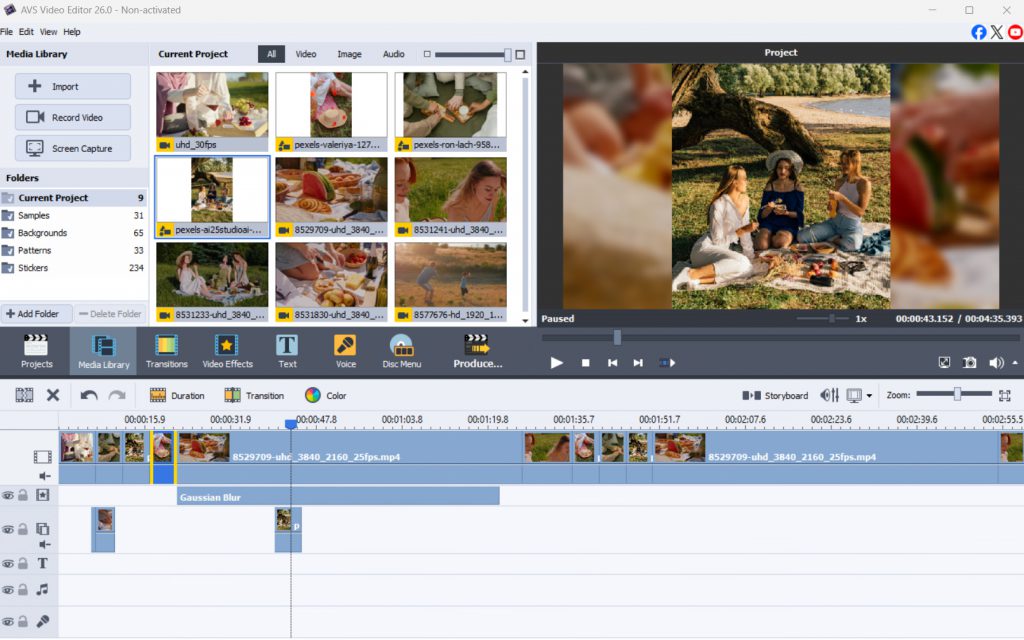
Before opening your editing software, create a clear folder structure. For example, a project folder may include the following subfolders: video clips, audio, music, graphics, exports, backup files, etc. Rename clips with descriptive names instead of keeping default camera filenames, e.g. “VID_00452.”
A clean workflow enables you to import assets quickly and manage large projects efficiently.
2. Use keyboard shortcuts
Keyboard shortcuts are one of the easiest ways to speed up video editing work. Instead of navigating menus repeatedly, shortcuts allow you to perform common actions instantly.
Some of the most useful shortcuts include cutting clips, undoing changes, splitting timeline sections, zooming in and out, copying and pasting effects, and controlling playback with quick play and pause commands.
Although they may take a little time to learn, after a few editing sessions they become automatic and save much time. That’s why professional editors use shortcuts so extensively, because small time savings make a big difference over longer projects.
3. Use AI-powered effects
Adding creative effects manually can take a lot of time, especially when trying to achieve a cinematic style. AI-powered plugins simplify this process significantly:
Effect Spiral
This plugin quickly adds dynamic spiral-style visual effects that would otherwise require advanced manual editing techniques.

Effect VHS
The VHS effect instantly creates retro analog-style results without complicated layering or manual adjustments.
Instead of building effects from scratch, editors can apply professional-grade presets in seconds. This saves time while improving the overall visual quality of the project.
For creators working on social media videos, music edits, or travel content, these resources greatly accelerate production.
4. Automate with AI-powered tools
Automation is changing how modern editors work. AI tools now assist with video generation, restoration, and enhancement tasks that in the past required hours of manual editing. AVS4YOU AI plugins provide several powerful automation capabilities:
Sora2 Video Generator creates video content from text descriptions, enabling creators to quickly generate scenes, assets, or base footage.
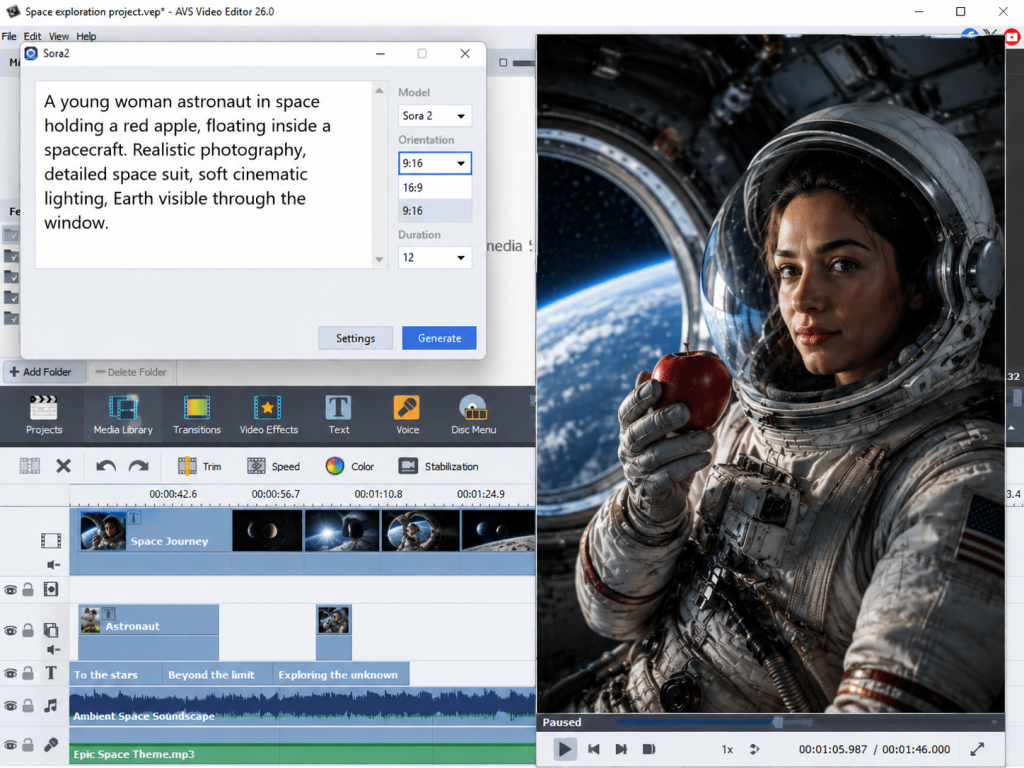
Old, blurry, or low-quality footage can be enhanced automatically with Effect Restoration Gaterv3 which embraces AI-driven restoration technology.

Automation reduces repetitive editing work and allows creators to focus more on storytelling, pacing, and creativity.
5. Pre-plan your edits
Editing becomes much faster when you know exactly what you want before opening the timeline. Simple planning methods include storyboards, shot lists, scripts, rough outlines, editing notes. For example, YouTubers often waste hours experimenting with clip placement because they begin editing without a clear structure.
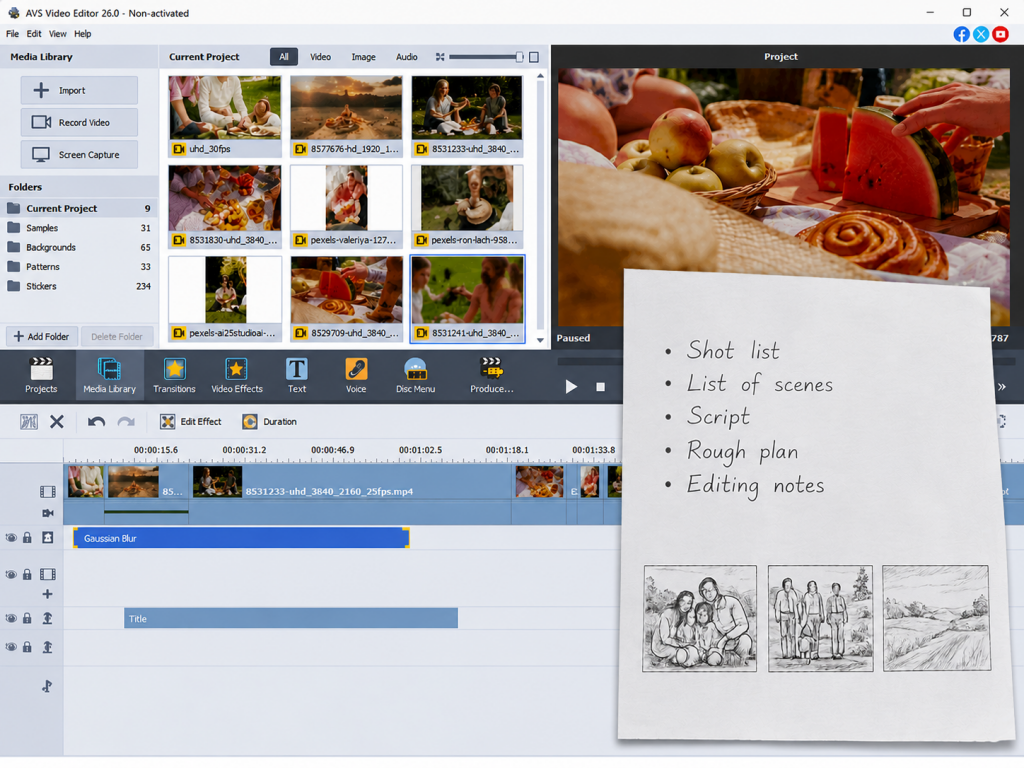
Pre-planning helps editors avoid unnecessary revisions, simplifies decision-making, maintains consistent pacing, and allows them to edit more confidently. Even a simple outline can significantly improve editing efficiency.
6. Use presets for color grading and effects
Color grading from scratch on every single clip wastes valuable time. Instead, build or download presets for your favorite looks.
If you shoot in the same room with the same lighting regularly, save your color correction settings as a preset. Drag and drop this preset onto future clips to instantly achieve a consistent, professional look. Apply this same logic to audio EQ settings and text animations.
7. Learn your editing software inside out
Many editors only use a small percentage of their software’s capabilities. Investing time in learning advanced features will save countless hours later. Key areas worth learning are proxy editing, timeline organization, batch exporting, auto-sync features, multi-camera editing, and others.
Watch tutorials on how to edit video efficiently using your specific software. Learn how to use proxy files for 4K footage, how to use adjustment layers, and how to create custom workspaces. The more familiar you become with your editing environment, the faster your workflow becomes.
8. Speed up routine edits with AVS4YOU AI Plugins
Repetitive tasks are one of the biggest productivity killers in video editing. AI-powered plugins automate many of these processes and streamline complex workflows.
AVS4YOU AI plugins eliminate the most tedious parts of post-production:
Sora2 Video Generator generates video clips from text prompts and creative descriptions.
Effect Restoration Gaterv3 improves video quality automatically by restoring damaged or low-resolution footage.
HeyGen AI Video Generator creates professional AI-assisted videos in an instant for marketing, presentations, tutorials, and online content.
AI automation is especially useful for content creators producing videos regularly.
9. Keep your system optimized
Even the best editing workflow can slow down if your computer struggles to handle video files effectively. Keep your system running smoothly by performing regular computer maintenance.
Clear your media cache once in a while to free up hard drive space. Update your graphics card drivers and ensure you have the latest version of your software. Finally, close unnecessary background applications such as web browsers or chat programs during editing, and dedicate all your RAM to rendering video.
10. Take breaks to stay focused
Long editing sessions reduce concentration and lead to mistakes. Many editors believe working nonstop improves productivity, but short breaks actually restore focus and creative thinking.
Step away from your computer every hour. A short ten-minute walk rests your eyes and clears your mind. Frequent breaks boost your concentration, prevent creative burnout, and ultimately let you finish your project faster.
Recommended software
Choosing the right software considerably improves your video editing workflow.
Here are some popular editing solutions:
AVS4YOU Multimedia Suite
A user-friendly suite that combines video editing, file conversion, slideshow creation, and media management in one place. Designed for everyday content creation tasks, it offers an accessible workflow without requiring advanced editing experience.
Adobe Premiere Pro
Excellent for seamless integration with other creative apps, making it easy to move projects between video editing, motion graphics, and audio workflows. It’s a popular choice for creators and professionals who need flexibility and a wide range of editing features.
Final Cut Pro
Incredibly fast rendering for Mac users, helping reduce waiting time during editing and export. Its optimized performance and streamlined interface make it especially appealing for those who work within the Apple ecosystem.
DaVinci Resolve
Widely recognized for advanced color grading and professional audio post-production capabilities, it also combines editing, visual and sound effects in a single platform for an efficient production workflow.
To further improve efficiency, many editors combine their editing software with AI-powered plugins and automation tools. These additions simplify repetitive tasks and streamline the overall editing process. Combined with good workflow habits, they can help you work faster and create better-looking videos.
The Bottom line: Edit smarter, not harder
Editing videos faster means building smarter habits, improving workflow efficiency, and using the right software. When creators organize their footage, learn a few shortcuts, use presets, plan ahead, and tap into AI tools, they cut editing time dramatically without sacrificing quality.
AVS4YOU AI plugins make video editing easier and faster than ever. From automated restoration to AI-generated assets and instant effects, these tools let editors spend less time on busywork and more time on what actually matters — crafting premium content.
Give AVS4YOU AI plugins a try today and see how much faster and smarter your next project will be.