



Why AI plugins are the future of branded content
Branded content has become a core part of modern marketing. Audiences expect fresh visuals every single day across various platforms. But producing high-quality videos and images requires expensive gear, large teams, and hours of editing.
Fortunately, artificial intelligence offers a smarter way to work. By using enhaned features of AVS4YOU AI plugins, you can scale your marketing efforts without sacrificing quality. From generating videos with Sora 2, to creating avatar-based content with HeyGen, to applying distinctive visual effects, marketers and creators can produce memorable branded content more efficiently.
The role of AI in crafting unique brand stories
AI plugins do not only automate routine tasks, but they also unlock new creative possibilities.
Here’s how they elevate branded content:
1. Turn ideas into videos instantly
Sora 2, a text-to-video tool, allows you to generate professional-quality clips from simple prompts. Instead of starting from scratch, describe your idea and refine the output.
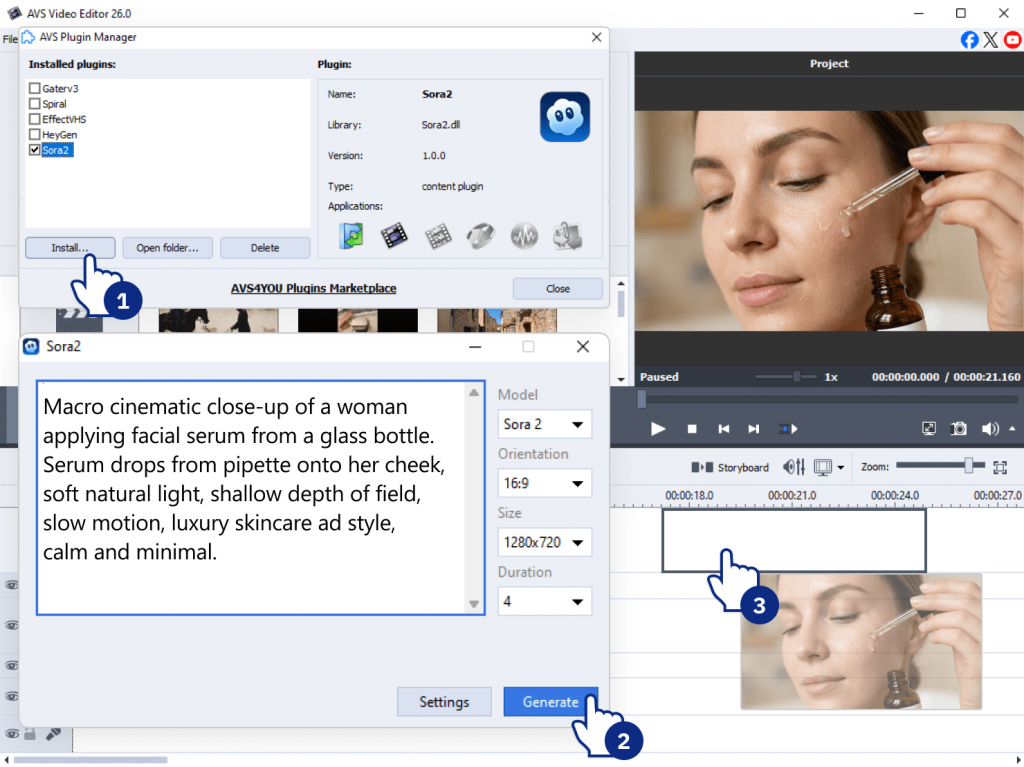
2. Create avatar-based content at scale
With HeyGen, you can produce videos featuring virtual presenters. This is ideal for tutorials, product explainers, or social media content without hiring actors or filming setups.
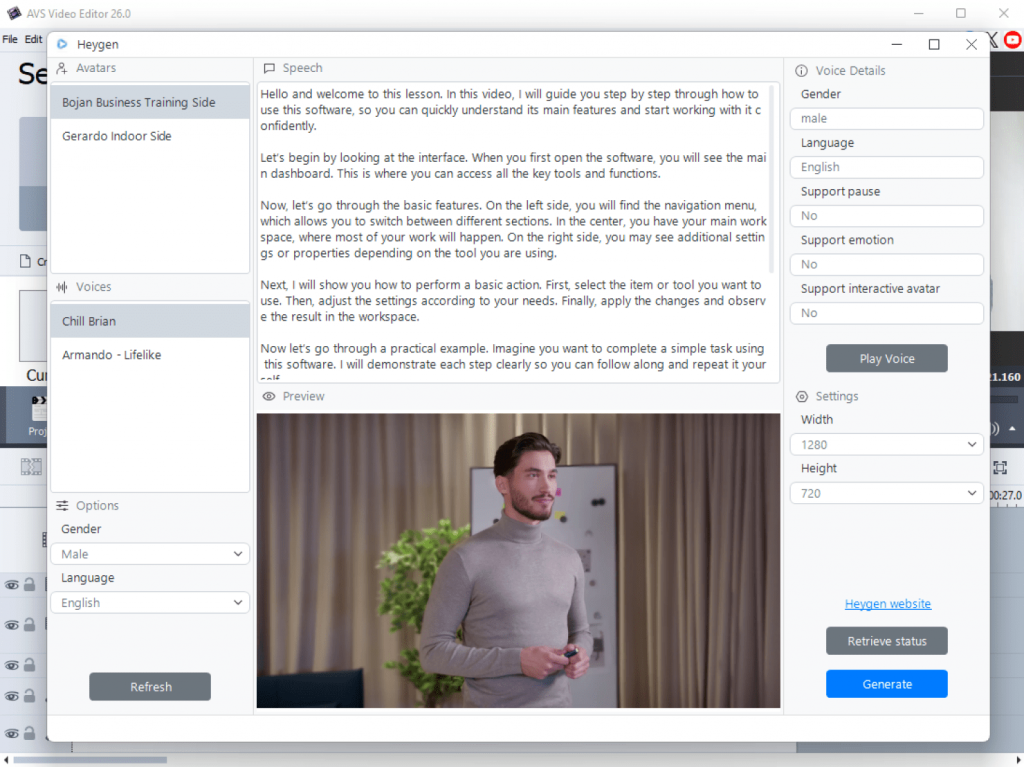
3. Reinforce brand identity with visual effects
VHS or Spiral creative effects help define your visual style. Whether you want a nostalgic look or something more dynamic, these effects make your content recognizable.
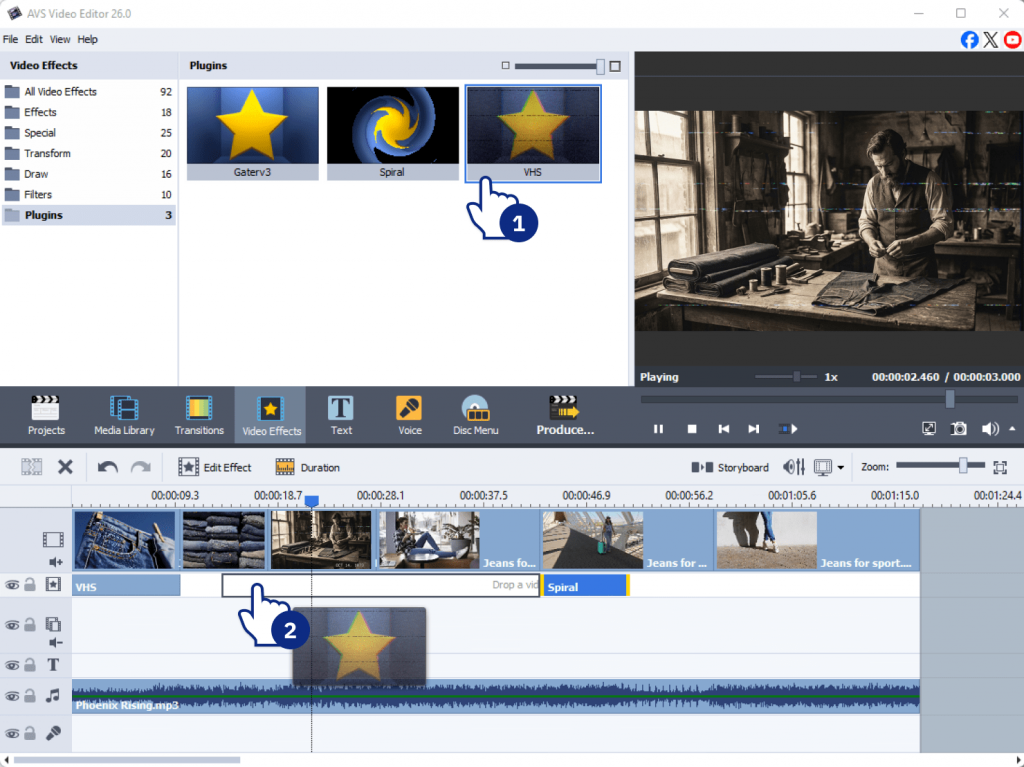
4. Restore and enhance existing footage
Older or low-quality videos can be enhanced by applying Effect Restoration Gaterv3. This is especially useful for campaigns that rely on archival material or repurposed content.
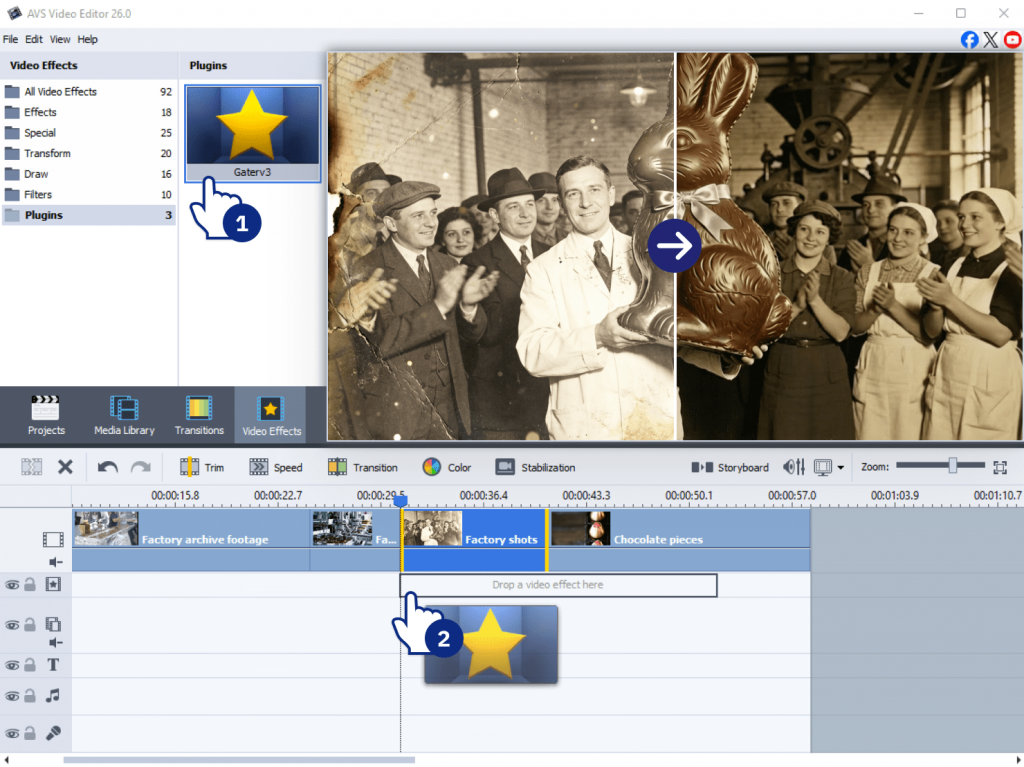
This results in faster production, more consistent branding, and greater creative flexibility.
Step-by-step guide: How to develop digital assets with AVS4YOU AI Plugins
Here is a practical example how to create branded materials.
Step 1: Define your brand’s visual style
Before creating content, clarify how your brand should look and feel.
- Choose a consistent color palette and tone
- Decide on a visual direction: clean, bold, retro, cinematic
- Select effects supporting your identity
For example:
- Use VHS for a nostalgic, retro aesthetic
- Use Spiral for energetic, modern visuals
This ensures all content feels cohesive.
Step 2: Generate video content with Sora 2
Start by creating a base video using a text prompt.
Here is an example prompt:
“A serene beach at sunset with our brand logo drawn in the sand, soft waves, warm lighting.”
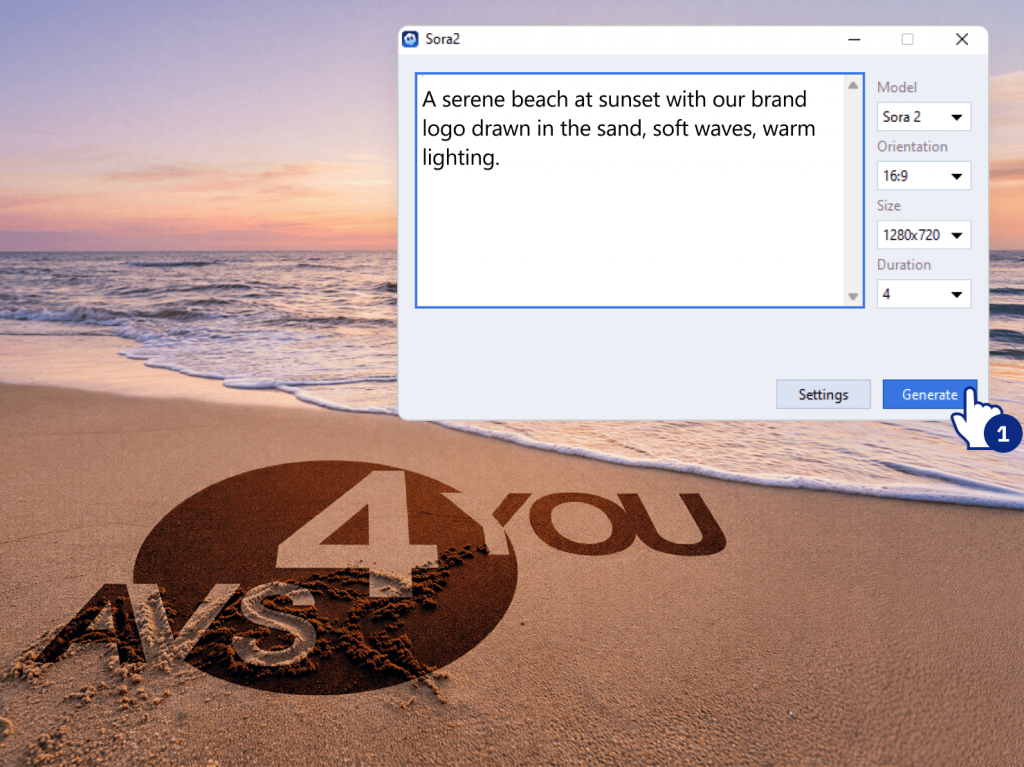
From there, customize resolution (HD, 4K), duration, choose the output format (social media, website, ads).
Tip: The more descriptive your prompt, the better the result.
Step 3: Create avatar-based videos with HeyGen
Next, add a human element using AI avatars.
- Write a short script (intro, explanation, CTA)
- Choose an avatar style to fit your brand
- Add branded backgrounds or overlays
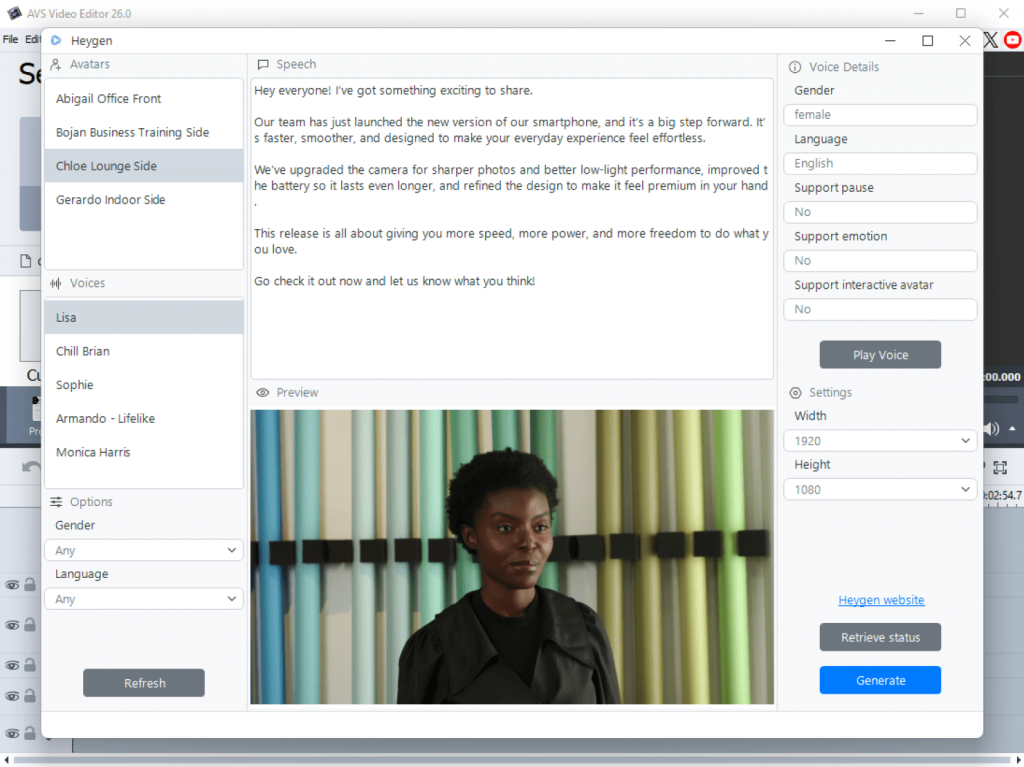
The most common use cases are product tutorials, marketing messages, social media clips.
This is a fast way to produce professional-looking videos without filming.
Step 4: Enhance existing media with Effect Restoration Gaterv3
If you already have footage:
- Upload old or low-quality clips
- Apply restoration to improve clarity and sharpness
- Adjust brightness, contrast, and detail
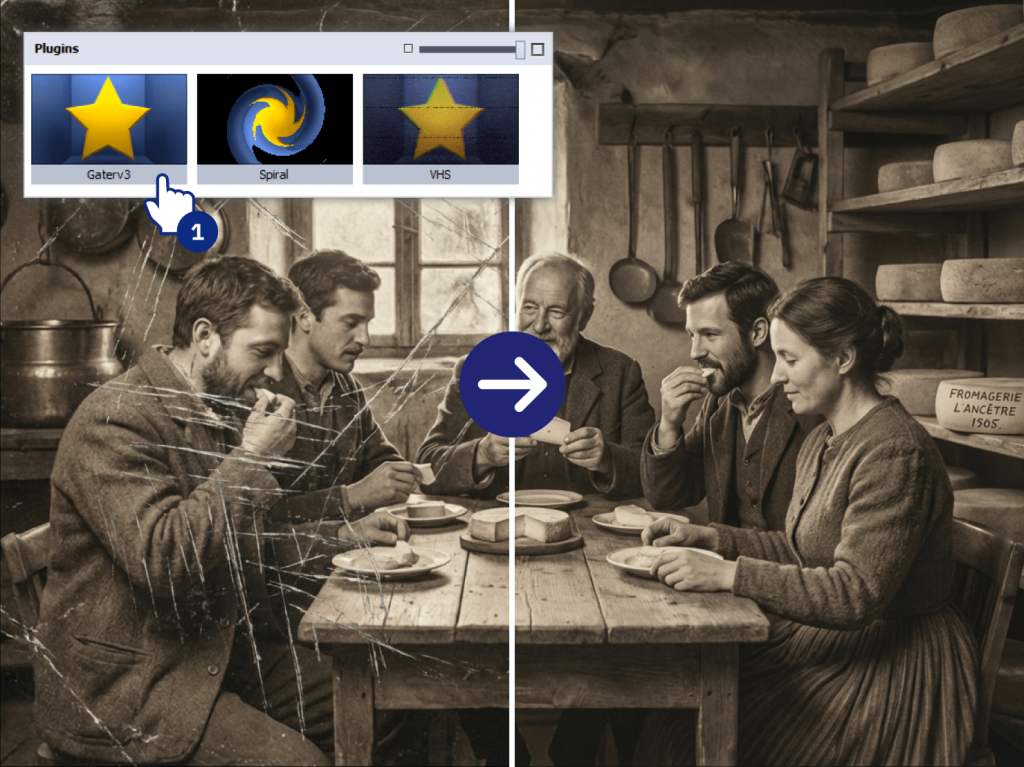
This step is especially useful for legacy campaigns, customer testimonials and heritage storytelling.
Step 5: Apply creative effects for branding
Finally, add finishing touches.
- Use VHS for intros or flashback sequences
- Apply Spiral for transitions or high-energy moments
- Keep effects consistent across videos
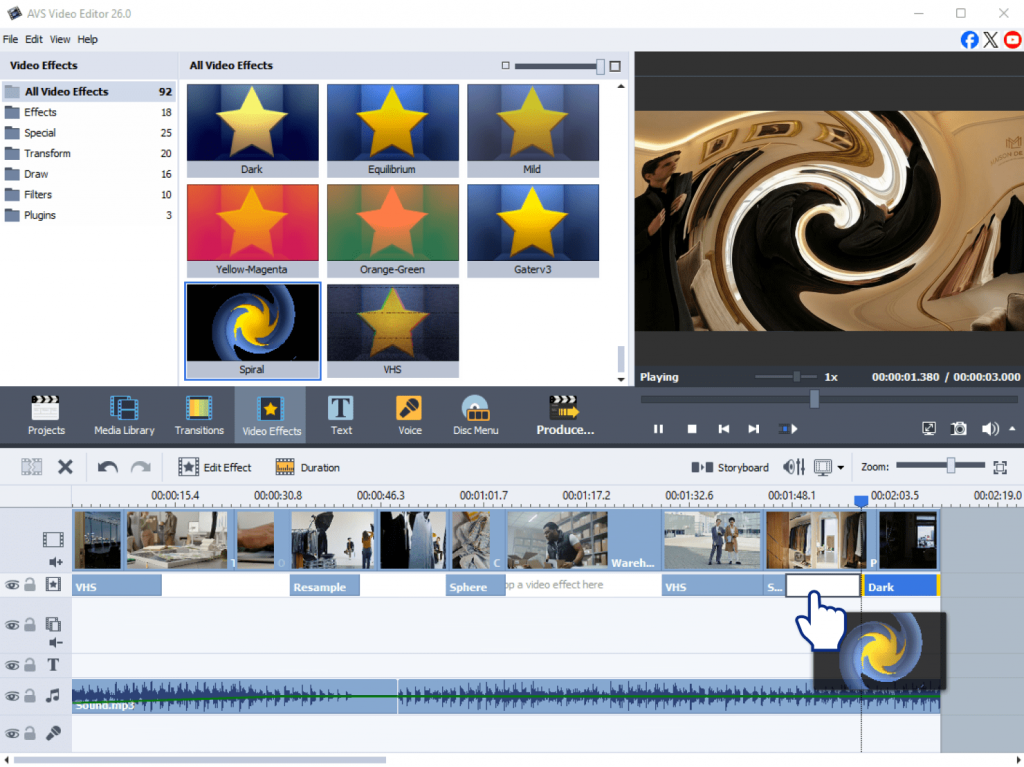
Use effects sparingly so they enhance your message rather than pull attention away from it.
Tips for effective branded content creation with AI plugins
Follow these best practices to get better results:
- Write clear prompts
Be specific about setting, mood, colors, and motion. - Use effects strategically
Too many effects can overwhelm the viewer. - Combine tools for stronger output
For example, generate a scene with Sora 2, then add an avatar with HeyGen. - Test and iterate
Try different styles and formats to see what works best for your audience. - Stay consistent
Maintain the same tone, colors, and visual identity across all assets.
Real-life applications of AI plugins for branding
AI plugins are flexible and work across many scenarios:
Social media campaigns
Create short, eye-catching videos with dynamic visuals.
Tutorials and explainers
Use avatar-based videos to simplify complex topics.
Heritage and storytelling campaigns
Restore old footage to highlight your brand’s history.
Product launches
Combine effects and transitions to spark excitement.
A powerful approach is combining Sora 2 for visuals and HeyGen for presentation. This blend helps create first-rate, engaging resources with minimal effort.
Transform your brand’s content with AVS4YOU AI plugins
Artificial intelligence is fundamentally changing how marketers approach video and image production. AVS4YOU’s AI plugins offer an incredibly efficient way to generate, enhance, and stylize your media. They eliminate the traditional barriers of high costs and steep learning curves, putting studio-quality tools directly into your hands.
If you want to improve your marketing strategy and craft engaging visuals faster, it’s worth exploring what AVS4YOU tools can do.