



Video is one of the clearest ways to show customers what you offer, answer their questions, and build brand recognition. Yet for many small business owners, marketing videos seem difficult to produce because they require expensive equipment, a camera team, and professional editing skills.
AI is changing that. Modern AI video tools let small businesses create videos from scratch or turn a simple script, product photo, blog post, or existing clip into a finished video much faster. You still need a clear message and a basic plan, but AI can handle time-consuming tasks such as creating scenes, generating narration, adding captions, and adapting videos for different social platforms.
This guide explains how to create marketing videos with AI, which video formats work well for small businesses, and what to look for in an AI marketing video maker.
Why video marketing matters for small businesses
People often want to see a product or service in action before making a purchase. Video gives businesses a simple way to demonstrate how a product works, explain its benefits, or answer common questions. As a result, video supports customers at different stages of their buying journey.
Small businesses typically use marketing videos across a range of channels, including: social media profiles and feeds, website homepages and landing pages, product pages and online stores, email newsletters, paid advertising campaigns, sales presentations and proposals.
Short-form videos are particularly effective on Instagram, TikTok, and YouTube Shorts, where audiences tend to respond to clear, concise ideas delivered quickly.
For small businesses, continuity is often more valuable than perfection. Publishing useful videos regularly lets maintain an active presence and gives businesses more opportunities to reach and connect with potential customers.
What AI video tools do
An AI video maker uses artificial intelligence to simplify parts of video production. Depending on the platform, you might begin with a written prompt, a short script, a blog post, product images, clips from your phone, or a template.
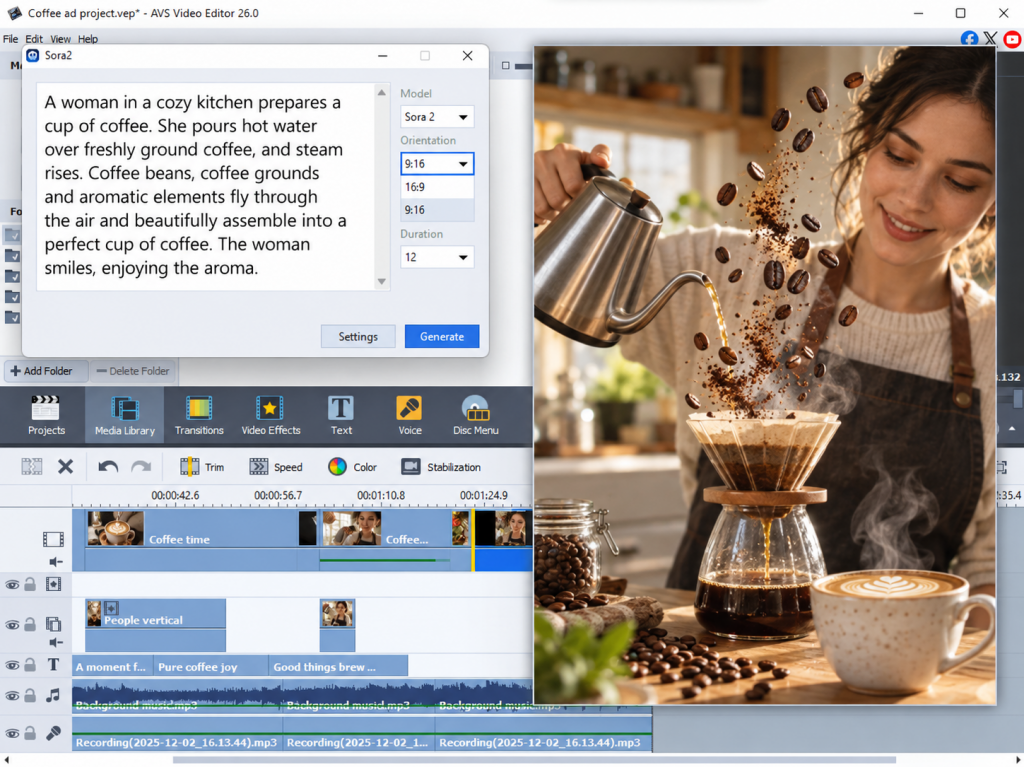
The software then helps transform those materials into a structured video. It may suggest scenes, generate stock-style visuals, match footage to your text, produce an AI voiceover, create captions, or format the project for a specific channel.
Not every platform offers every feature. Some tools focus on avatars and narration, while others are stronger at social media videos, templates, or editing. The right choice depends on the content you want to publish and how much flexibility you need.
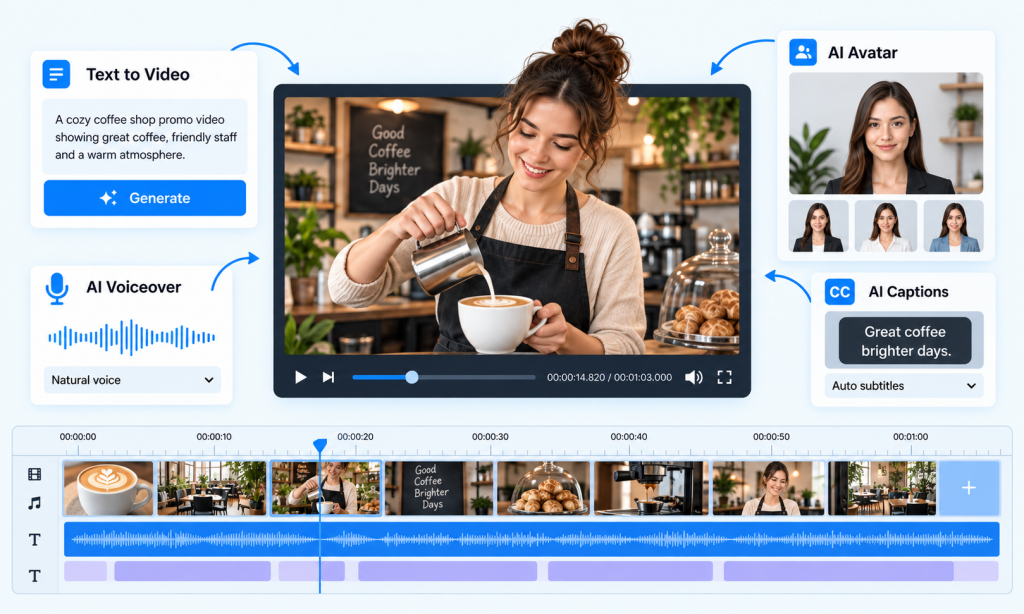
Key features at a glance
| Feature | Useful for |
| Text-to-video | Turning a prompt, script, or article into a first video draft |
| AI avatars | Tutorials, internal updates, explainers, and presenter-led content |
| AI voiceovers | Narration when you do not want to record your own voice |
| AI captions | Making videos easier to understand without sound |
| Templates | Producing promotional and social videos faster |
| AI-generated visuals | Creating scenes when you do not have ready footage |
| Video editing tools | Refining generated clips, recorded footage, audio, and pacing |
The biggest advantage is not that AI removes all creative work but it speeds up and simplifies the process of turning an idea into a publishable video.
How AI helps small teams
AI-assisted small business video production offers several benefits:
- less time spent on content creation
- suitable for people without editing experience
- no need for professional filming equipment
- easier to repurpose one idea for several channels.
- faster testing of messages, headlines, visuals, and calls to action
- more regular publishing
For example, a local fitness studio could turn one article about beginner workouts into three pieces of social media video content: a 20-second tip, a short class introduction, and a promotional clip for a free trial. The core message is the same, but each version suits a different audience or platform.
Ready to explore AI-assisted creation? Start with a short, low-scale project, such as a product tip or a social announcement, rather than a full brand campaign.
Types of marketing videos to create with AI
From promoting a product to explaining a complex idea, AI video tools support a variety of content formats. The main difference is how AI is used to produce each video type.
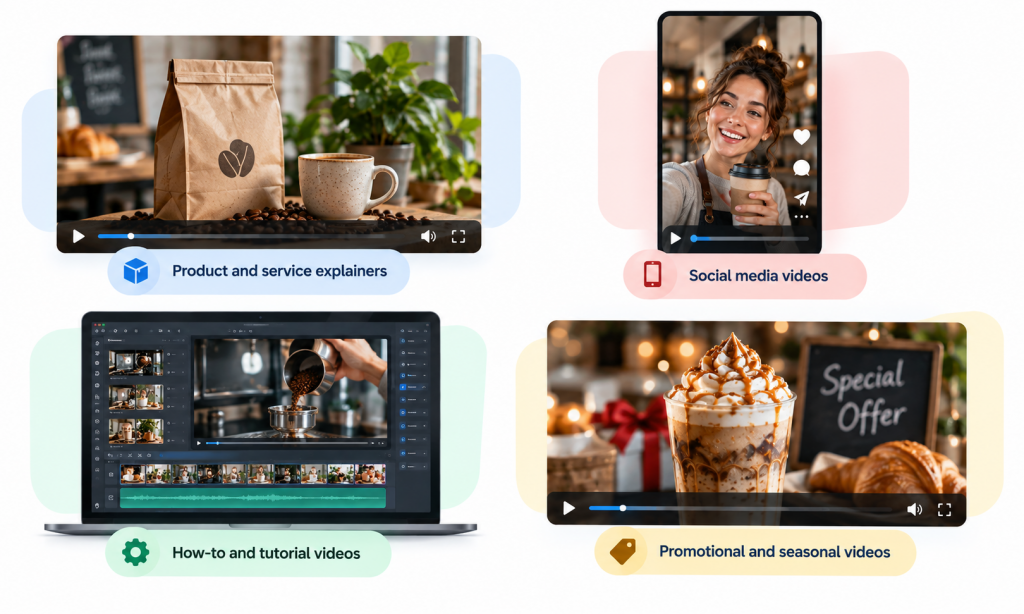
Product and service explainers
Explainer videos introduce a product or service, show how it works, and highlight its main benefits. AI simplifies much of the production process by turning a short description or written outline into a video script, generating or selecting relevant visuals, creating narration, and adding captions.
Social media videos
AI is particularly useful for creating short-form content for social media. It can turn a blog post, product description, customer question, or longer video into several shorter clips and adapt them to different formats such as vertical video.
How-to and tutorial videos
Tutorial videos explain how to use a product, complete a task, or follow a particular process. AI transforms instructions into a structured script and then combines screen recordings, product images, generated visuals, narration, and captions.
Promotional and seasonal videos
Promotional videos are designed to communicate a specific offer, such as a discount, product launch, event, or seasonal campaign. AI speeds up their creation by generating short scripts based on the promotion, suggesting scene ideas, creating visuals, and adding text overlays.
Customer stories and testimonials
Customer stories traditionally require filming an interview, editing the footage, and adding supporting visuals. AI reduces the amount of manual work by turning a written review into a video script, transcribing the interview, removing unnecessary sections, identifying key quotes, and assembling the strongest parts into a shorter testimonial.
Educational and expert content
Educational videos allow businesses to share useful information while demonstrating their expertise. With AI assistance, it is easy to transform existing knowledge into video content by creating a script from a topic or source text, generating visuals to illustrate complex ideas, and producing narration and captions.
AI can also repurpose existing articles, guides, or presentations into video content, giving businesses another way to use their material.
Behind-the-scenes videos
Behind-the-scenes videos show how a business operates, from preparing orders to making products or delivering services. Unlike fully AI-generated videos, this type of content usually starts with original video.
AI refines footage by automatically removing unwanted sections, generating captions, improving audio, creating a short script or voiceover. It can also adapt the video for different platforms, making editing faster while keeping the content authentic.
How to create a marketing video with AI
Once you have an idea, it takes just a few steps to create a marketing video with AI.
Step 1: Define your goal and message
Decide what you want the video to achieve, who it is for, and what you want viewers to do next. Focus on one main message rather than trying to explain everything about your business.
Step 2: Choose an AI video tool
Select a tool based on the type of video you want to create and how much control you need over the final result. Look for features such as AI script generation, text-to-video, templates, AI voiceovers, captions, stock media, and brand controls. Also check export formats, watermarks, and pricing.
Step 3: Create a short script
A simple structure works for most marketing videos:
- Start with a problem, question, or hook.
- Introduce your product or solution.
- Highlight the main benefit.
- End with a clear call to action.
Follow this rule – AI generates a first draft, but you have to adapt it to your product, audience, and brand voice. Check all facts and remove generic claims before using it.
Step 4: Create and edit the visuals
Choose a template, use your own photos and videos, generate visuals with AI, or combine these options.
AI allows to generate scenes, select suitable stock media, create transitions, and assemble clips. Your own visuals are especially useful for showing real products, locations, people, or customer experiences.
Keep each scene focused on one idea and avoid filling the screen with text.
Step 5: Add voiceover and captions
AI voiceovers let you add narration without recording it yourself. Choose a voice that fits your audience and check the pronunciation of names, numbers, and product terms.
Add captions as well, particularly for social media videos. Although auto-generated captions save time, there may be some mistakes, so always review them for accuracy and readability.
Step 6: Review and publish
Watch the finished video on a phone before publishing. Check that the message is clear, the information is accurate, the captions are correct, and the call to action is easy to understand.

Finally, export the video in the format and aspect ratio required by the chosen platform and publish it, adding an appropriate caption or link.
Best AI video tools for small businesses
Different tools suit different needs. Some are designed for fast social content, while others offer AI avatars, text-to-video workflows, or more detailed editing.
| Tool | Best for | Ease of use | Pricing approach |
| AVS4YOU | AI-assisted video creation, avatar videos, and stylization. | Easy to moderate | Subscription access across AVS4YOU software |
| Canva Video | Beginners already creating visual content in Canva | Very easy | Free plan with paid Pro option |
| Pictory | Turning scripts and articles into short videos | Easy | Trial and paid plans |
| InVideo | Social posts, ads, and template-based promos | Easy | Free plan and paid plans |
| Synthesia | Presenter-style business videos with AI avatars | Easy | Paid subscription plans |
| HeyGen | Avatar videos, voice sync, and multilingual content | Easy to moderate | Free trial or limited tier with paid plans |
| Runway | More creative visual generation and editing | Moderate | Free tier with paid plans |
| Sora | Short text-prompted visual clips and concept videos | Moderate | Access depends on the associated subscription and availability |
Pricing, plan limits, and AI features change frequently, so check the current plan details before choosing a platform.
The practical choice is the one your team will actually use. Start with a free plan or trial when possible, make one short video, and evaluate the process before committing to a paid subscription.
Create your first AI marketing video
AI marketing videos make video production more accessible, but the most effective content still begins with a useful idea. You do not need to produce a major campaign on your first attempt. Start with one product demonstration, a customer question, a short tutorial, or an announcement you already need to share.
Choose a simple format, write one clear message, and create a first version. Then review how people respond. Watch time, clicks, comments, direct messages, and conversions will tell you more than trying to guess what might work.
With an AI video maker and a straightforward process, small business video marketing becomes a practical habit rather than a major production project. Try an AI-assisted workflow in AVS4YOU, create your first short marketing video, and use what you learn to make the next one better.
Ready to create your first marketing video? Try AVS4YOU and explore AI-powered video creation and editing tools designed to make video production easier.
Frequently Asked Questions
Do I need editing experience to use AI video tools?
No. Many AI video makers are built for beginners and offer templates, guided workflows, automated captions, and pre-made layouts.
How much do AI video makers cost?
Costs range from free plans with limited features to monthly subscriptions. Free options are useful for testing a workflow, but they may include watermarks, lower export limits, restricted AI credits, or limited access to stock media.
Can I make social media videos and ads in one tool?
Many video marketing makers support vertical, square, and horizontal formats, so it is easy to adapt one campaign for several channels.
How long does it take to create a video with AI?
A simple video based on a ready script and template may take less than an hour. The first project usually takes longer while you learn the interface and prepare your brand assets.
Are AI-generated videos good enough for business marketing?
They can be, especially for explainers, social clips, tutorials, announcements, and promotional content. The final quality depends on the message, visuals, review process, and how well the video represents your business.