



Introduction
If you’re editing video for an international audience, converting old home movies, or simply trying to figure out the best export settings, you’ve likely come across the terms NTSC and PAL.
Originally designed as analog television broadcast standards, their legacy still shapes today’s digital video, affecting frame rates, compatibility, and playback quality on different platforms. In this post, we’ll analyze the key differences between NTSC and PAL and explain which one you should use for YouTube, DVDs, and streaming services today.
NTSC vs PAL: From TV standards to YouTube and DVDs
Before diving into today’s platforms’ specifications, let’s quickly review what sets NTSC and PAL apart.
NTSC (National Television System Committee)
Frame rate: 29.97 fps (often rounded to 30 fps)
Resolution: 720 × 480 (DVD standard)
Used mainly in North America, Japan, South Korea
PAL (Phase Alternating Line)
Frame rate: 25 fps
Resolution: 720 × 576 (DVD standard)
Common in Europe, Australia, and parts of Asia
Being aware of these frame rate distinctions lets you tackle NTSC/PAL issues on YouTube and DVD formats with confidence.
NTSC and PAL for YouTube
YouTube is flexible when it comes to video standards, supporting multiple frame rates and resolutions. Itsservers automatically process uploaded videos into various streaming formats. Here, the question is not about which standard suits best, as both are acceptable, but what the best frame rate is for uploading YouTube content.
- Supported frame rates: 24, 25, 30, 48, 50, 60 fps
- For cinematic content: 24fps (or 23.976fps) is the industry standard and a safe choice.
- For standard video: 30fps (or 29.97) is common and provides a slightly smoother look than 24fps.
- For high-motion content (sports, gaming): 60fps is the best format for YouTube as it delivers incredibly seamless motion.
- If your source is 25fps (PAL): you can absolutely upload it to YouTube without additional manipulations. However, it is better to save it at 25 or 30fps if this video is blended with 30fps footage.
Key points:
- Keep the native frame rate of your footage, it was shot in. If the video is intended to be viewed globally, 30fps or 24fps are universally excellent options.
- Mixing PAL and NTSC clips in one project can cause shaky playback or mismatched timing.
- By converting footage to YouTube’s recommended formats, you can avoid problems when watching the video.
- With AVS Video Converter, you can quickly adjust frame rates and resolutions before uploading.
In short, if you’re exporting NTSC PAL YouTube videos or fresh 60 fps content, what matters most is to keep the same settings throughout the entire video project..
NTSC and PAL for DVDs
Unlike YouTube, DVDs are region-sensitive and closely tied to NTSC and PAL standards. The format you choose determines where your DVD can be played.
- PAL vs NTSC DVD considerations:
NTSC DVDs are standard in Region 1 (US, Canada).
PAL DVDs dominate Region 2 (Europe, Middle East) and Region 4 (Australia, New Zealand).
A PAL DVD may not play properly on an NTSC-only player, and vice versa.
If you’re authoring DVDs for global distribution, always consider:
- Target audience location
- Player compatibility
- Need for PAL/NTSC conversion
Most modern DVD players and game consoles are “multi-standard” and can play both formats, but many older players cannot. If you are creating a DVD for distribution, you must encode it in the standard of your target region to ensure maximum compatibility.
NTSC and PAL for streaming platforms
Streaming services (Netflix, Amazon Prime, etc.) handle frame rate conversions automatically. Still, the difference between NTSC and PAL matters in specific scenarios:
- Archival content: Old PAL or NTSC tapes must be digitized before uploading.
- Live streaming: Encoders work better with steady frame rates.
- Quality retention: Unnecessary frame rate changes (e.g., 25 fps → 30 fps) can cause motion distortions.
For NTSC PAL streaming, use the original format during upload. Most platforms re-encode video but keeping the native standard helps minimize quality loss.
How to convert NTSC and PAL in AVS Video Converter
If you’re working across different platforms, you have to switch between PAL and NTSC. With AVS Video Converter, the process is simple:
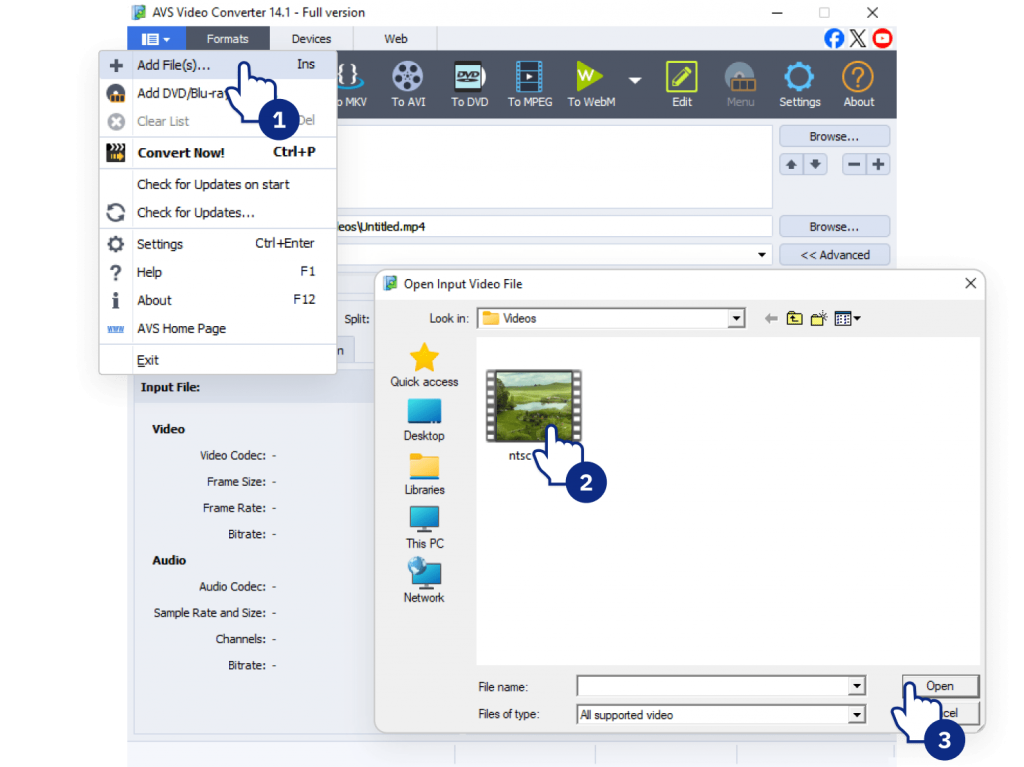
1. Import your video into AVS Video Converter.
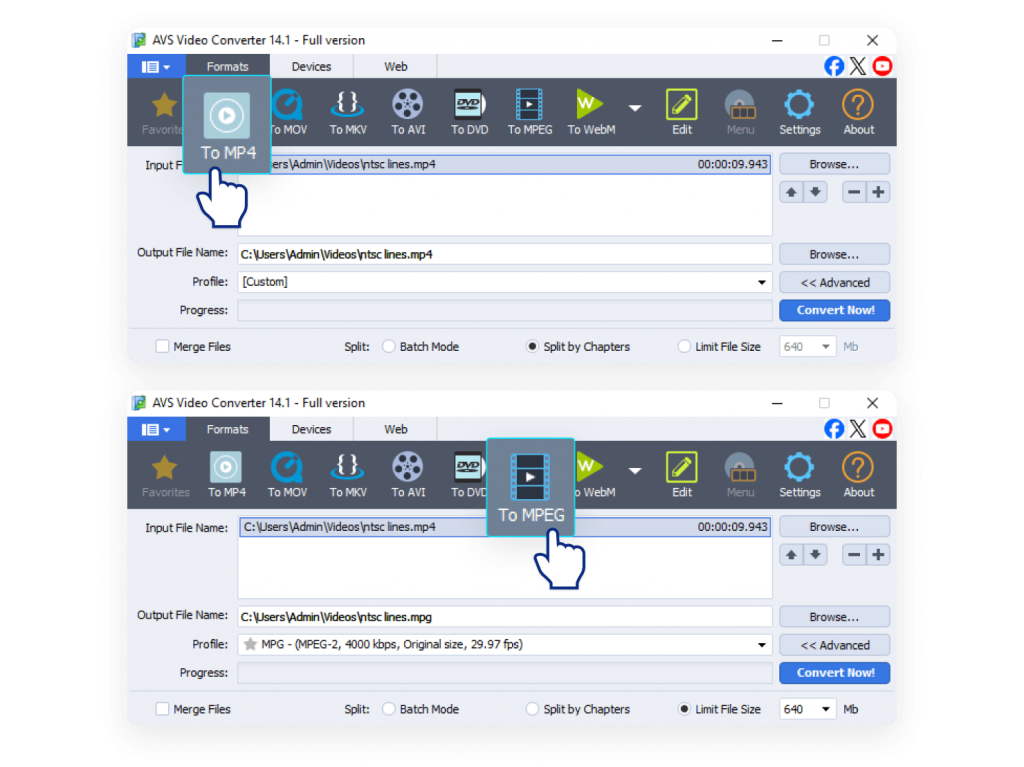
2. Choose the output format (e.g., MP4 for YouTube, MPEG-2 for DVDs).
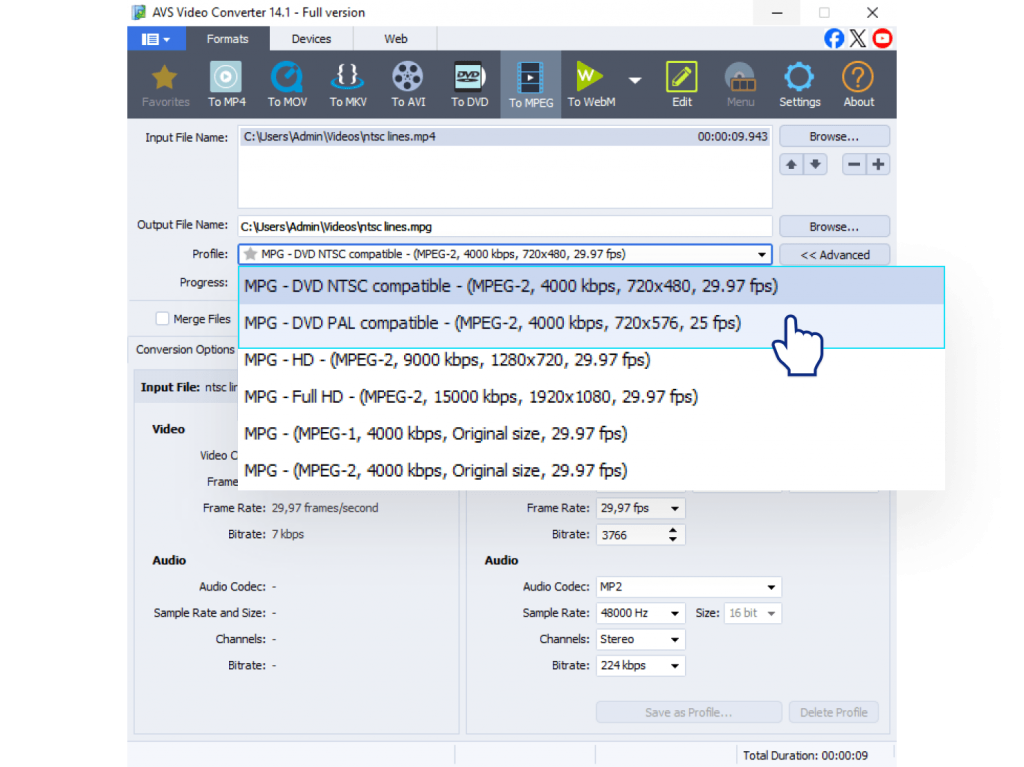
3. Adjust frame rate
YouTube: Match native fps: 30/60 for NTSC, 25/50 for PAL.
DVD: Select NTSC (29.97 fps, 720×480) or PAL (25 fps, 720×576).
Streaming: Select original fps for best results.
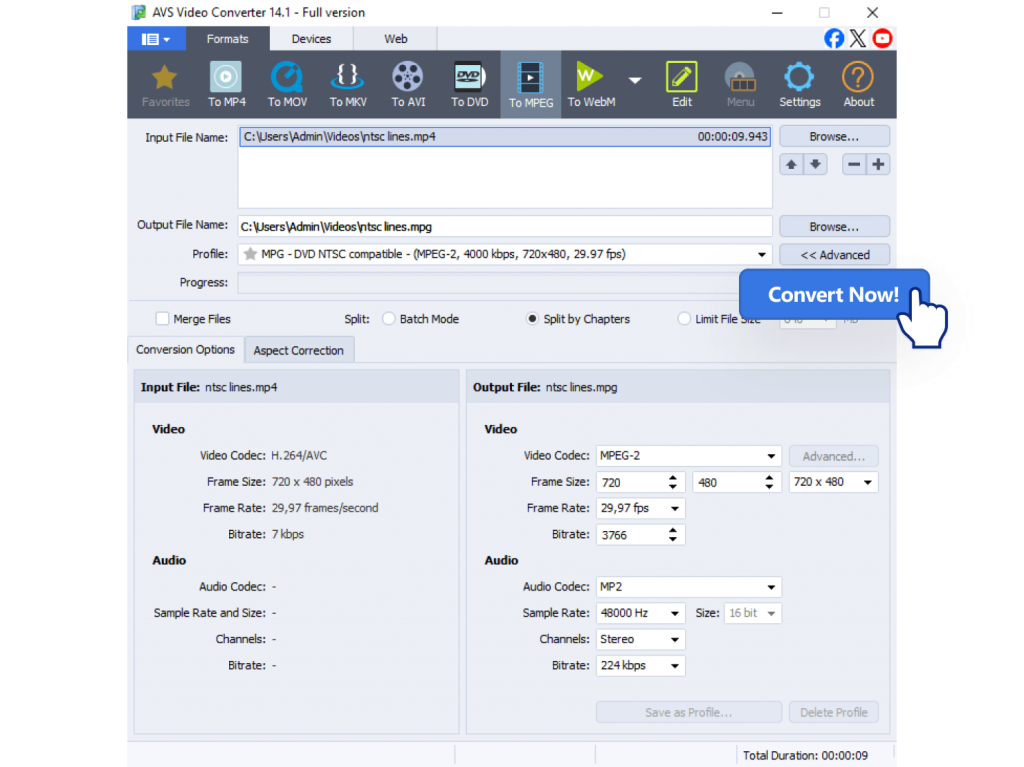
4. Export and save your optimized file.
Pro tip: Changing frame rates can make videos look a bit less natural, but AVS Video Converter uses filters to maintain best quality possible.
Other reliable video converters that support PAL↔NTSC conversion include HandBrake (free, open-source), Wondershare UniConverter, Any Video Converter, and Movavi Video Converter. These tools offer flexible settings and wide format support, but for Windows users, AVS Video Converter remains the best option.
Recommendations and Best Practices
- For YouTube
Maintain the frame rate your footage was shot in. Convert only if combining NTSC and PAL sources.
- For DVDs
Always match your target playback region: NTSC for North America, PAL for Europe.
- For Streaming
Upload at the native frame rate to minimize re-encoding issues.
- For legacy footage
If you’re digitizing old tapes, capture them in their native standard first. You can always convert the digital file later for a specific project. Use conversion tools to update content for modern platforms.
Adopting these guidelines will help you sidestep compatibility issues and preserve your videos’ professional quality.
Wrapping up, which is better, NTSC or PAL?
Despite being analog relics, NTSC and PAL still influence frame rates and regional DVD compatibility.For YouTube and streaming, frame rate choice is more about creative intent than broadcast standards. For DVDs, the standard is still crucial for hardware compatibility.
- YouTube: Both work, but keep your native footage’s frame rate.
- DVDs: Match the format to your audience’s region.
- Streaming platforms: handle both, but preserving the original format provides smoother playback.
The key is to understand where your video comes from, how it was recorded, and where/ on what platform you plan to share it. Converting PAL to NTSC for a DVD or optimizing your frame rate for YouTube is easy when you have the right tool.
Download AVS Video Converter to convert and optimize your videos for any platform.
Try AVS Video Editor for editing and creating polished, professional-looking video projects.