



Introduction
When working with sound, terms like audio joiner, audio merger, and audio combiner often come up. At first glance, they may seem interchangeable, but in audio editing each has a unique purpose. Understanding the differences can save time and help you achieve the best results for your project.
Choosing the right method depends on the task at hand. Joining audio parts into one file, merging multiple tracks, or creating a seamless playlist all require different techniques. The wrong approach can lead to messy audio that’s harder to edit later.
In this post, we’ll explain what each process involves, explore their pros and cons, and highlight the best situations to use them.
What Is audio joining?
Definition
Audio joining refers to combining multiple audio files one after another into a single track. Instead of blending sounds, you are simply creating a continuous file.
Example
It is similar to a playlist where Song A is followed by Song B, and then Song C, all saved as one file.
Pros
- Keeps audio segments intact without altering sound quality.
- Easy to perform, even for beginners.
- Creates seamless playback for multiple files.
Cons
- No blending between tracks (sudden transitions).
- Limited flexibility for editing later.
Best use cases
- Audiobooks where chapters are joined into one file.
- Podcasts with different segments combined together.
- Music mixes where songs are simply put one after another.
What Is Audio Merging?
Definition
Audio merging means layering multiple tracks so that their sounds blend together. Unlike joining, where one file starts only after the other ends, merging allows them to play at the same time.
Example
It’s like mixing a voice recording with background music, so both are heard simultaneously.
Pros
- Creates rich, layered sound.
- Perfect for music production and podcasts.
- Useful for adding effects and soundtracks.
Cons
- Harder to separate tracks once merged.
- Requires advanced editing skills.
Best use cases
- Mixing music and voice together
- Combining instruments in a music track.
- Creating overlaid audio effects for videos.
What Is Audio Combining?
Definition
Audio combining lets you put several audio files into one project without changing them, keeping each on its own track. This is the basis of multi-track editing. Unlike merging, files remain separate within the combined file.
Example
Imagine placing multiple interviews in one timeline but preserving each as a standalone segment.
Pros
- Provides full editing flexibility.
- Keeps multiple tracks well-organized.
- Allows easy rearranging and adjustments later.
Cons
- Can result in larger project files
- Requires an audio editor to manage effectively.
Best use cases
- Long podcasts with guest speakers.
- Video editing projects with multiple audio sources.
- Music production, mixing, and mastering.
- Any complex project that needs control over individual elements.
Comparison Table: Join vs. Merge vs. Combine Audio
| Feature | Joining | Merging | Combining |
| Output format | One continuous file | Single audio file | One project with separate tracks |
| File size | Smaller | Medium (depends on effects) | Larger (multiple editable tracks) |
| Editing flexibility | Low | Low after merging | High |
| Sound blending | No | Yes | No (files stay separate) |
| Common scenarios | Audiobooks, playlists | Music mixes, podcasts with music | Multi-track editing, video projects |
Choosing the right method for your project
The choice between using an audio joiner, an audio merger, or an audio combiner depends on your project:
- Join audio files to play them one after another without overlap.
- Merge audio to blend multiple tracks into one.
- Combine audio files to keep them separate for further editing.
As you can see, all these three audio editing tools are handy and compliment one another. No wonder that modern audio editors come fully packed with all essential features, allowing users to merge, join, and combine audio files with ease. It doesn’t matter whether you choose a freeware tool like Audacity, a more professional solution like Ocenaudio or Adobe Audition, or an online service such as Clideo or Kapwing—most audio editing apps support all three functions. However, factors like budget, data security, ease of use, and your preferred platform should also be considered when choosing the best solution.
AVS Audio Editor – the best audio joiner, merger and combiner for Windows
AVS Audio Editor is a powerful audio editing software for Windows, allowing uses to cut, join, merge and combine audio files with ease, even for beginners. To perform all three functions, it is necessary to create a new project in the program. For joining audio, just arrange one track after another on the timeline, and save the output audio in the desired format. You can find useful information which audio format suits best for different tasks here. To merge files together, overlap tracks in a your project so that they play at the same time.
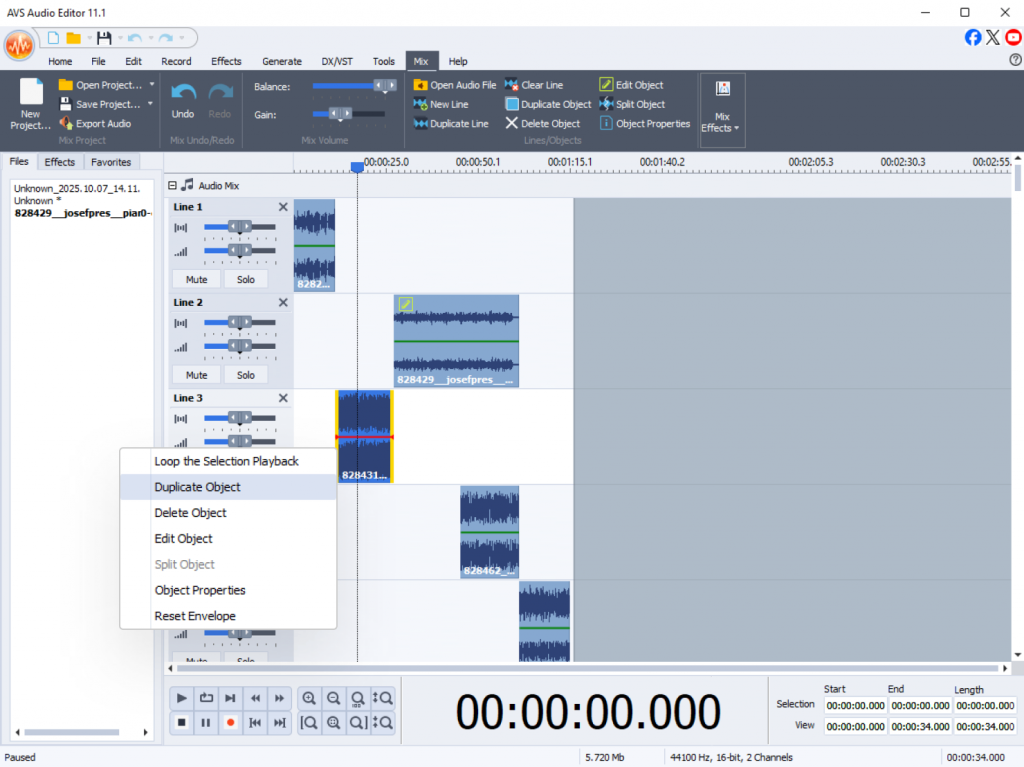
Combining and joining audio feel like the same process in AVS Audio Editor with the only difference. While joining, you put tracks one after another in a project and export it as one file. When combining audio, you collect tracks in one project and they stay separate until you decide whether to join or merge.
Along with joining, merging, and combining, the software covers everything from basic cutting and trimming to advanced tools within an intuitive interface. You can record audio, enhance the quality of your audio recordings, remove noise and apply special effects to make your sound crystal clear without a steep learning curve.
Ready to try it out? Read our step-by-step guide: The Best Way to Join, Merge & Combine Audio (Pros & Cons).
Download AVS Audio Editor today and experience how easy it is to edit audio files for any project, from the simplest to the most complex!