


Introduction
AI video editing is quickly becoming part of everyday content creation. Tasks that once took hours, for example, enhancing footage, polishing images, or applying complex effects, now are done in minutes.
AVS4YOU AI plugins easily handle these operations. They are integrated directly into the software and simplify complex workflows without requiring advanced skills.
However, having excellent tools isn’t enough. It’s creative ideas that turn simple edits into engaging videos. In this article, we’ll explore ten creative projects that showcase exactly what you can achieve with the AVS4YOU AI plugins. Get ready to be inspired.
What are AVS4YOU AI Plugins?
AVS4YOU AI plugins are built-in extensions designed to facilitate video generation, automate repetitive tasks and enhance files smarter and faster. They are available in AVS Video Editor, AVS Video Converter, and AVS Image Converter. The current plugins support a range of tasks:
- Generate video clips from text prompts
- Restore old or low-quality footage
- Apply stylized visual effects
- Enhance sharpness, color, and detail
They are especially useful for beginners who can pick them up quickly, work efficiently, and experiment easily.
10 Creative project ideas using AI
Here are ten practical ways to use the new AVS4YOU AI plugins for your next video project.
1. Turn text prompts into short social media videos
Creating short-form video content often requires constant filming, editing, and idea generation. With AI, you can skip most of that process and generate ready-to-use clips directly from text descriptions.
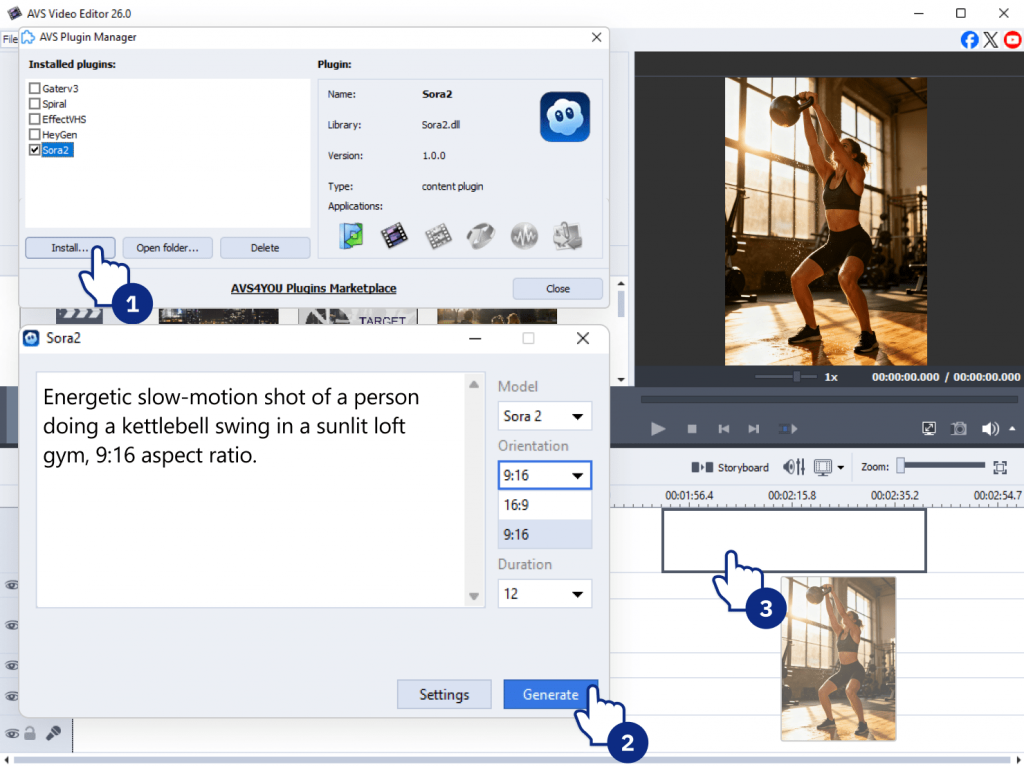
AI Plugin/Effect: Sora2 Video Generator
Example: You’re a fitness coach promoting a new workout. Instead of filming, type a sample prompt “Energetic slow-motion shot of a person doing a kettlebell swing in a sunlit loft gym, 9:16 aspect ratio.” The plugin generates a short, high-quality clip which is placed directly into your timeline.
Why it works: Ideal for content creators, social media managers, and marketers who need to publish frequently without spending hours on production. It also helps test content ideas quickly before investing in full production.
2. Restore and enhance old family videos
Old footage often suffers from low resolution, faded colors, and visual noise. AI restoration tools are able to significantly improve these issues, making videos clearer and more watchable.
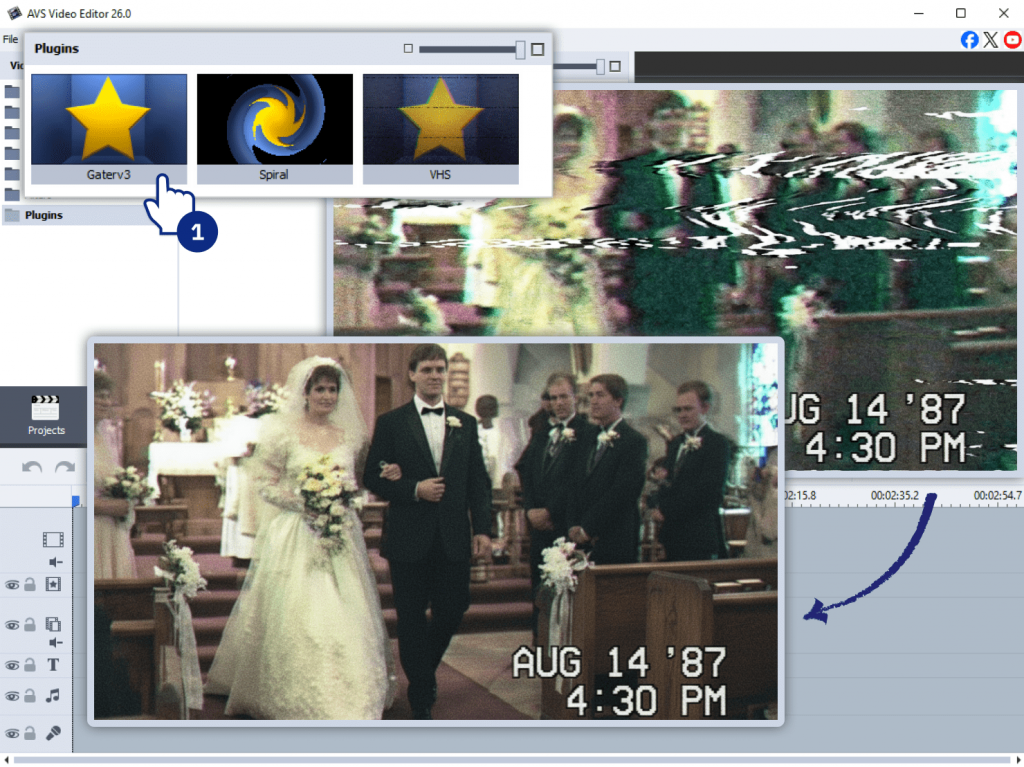
AI Plugin/Effect: Effect Restoration Gaterv3
Example: You have a digitized VHS tape of your parents’ wedding from the 1980s. The footage is noisy, colors are faded, and it’s slightly blurry. By applying the Restoration Gaterv3 plugin in AVS Video Editor, the AI automatically reduces the noise, sharpens details, and corrects the color. As a result, it looks crisp and vibrant.
Why it works: Perfect for preserving personal memories or creating meaningful family archives. It’s also useful for documentary-style content where historical footage needs improvement.
3. Create retro VHS-style music clips
Nostalgic visuals are in trend across various platforms. AI effects can replicate analog imperfections such as grain, distortion, and color shifts to achieve an authentic retro effect.
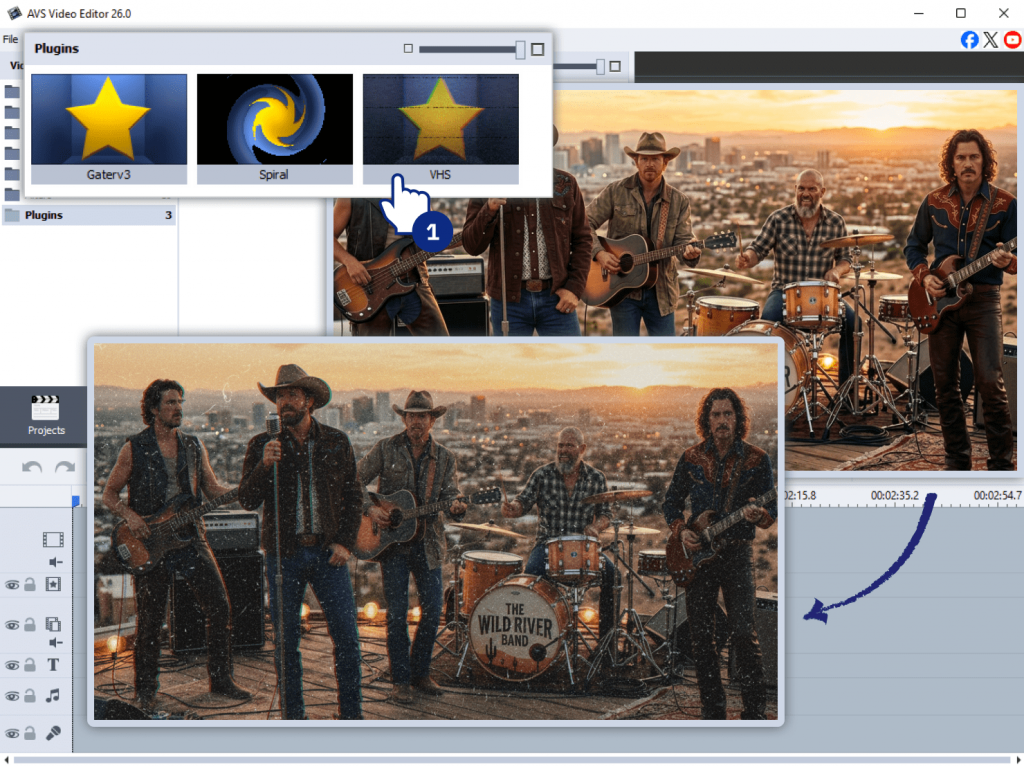
AI Plugin/Effect: Effect VHS
Example: A local band wants a music video that feels like a lost 90s recording. Import a modern video file into AVS Video Editor and apply AI-based VHS effect. It adds original analog artifacts such as tape noise, color bleeding, and tracking errors, instantly transporting the viewer back in time.
Why it works: Appeals to audiences who enjoy a vintage look. It’s widely used in music videos, creative edits, and social content where style matters as much as the message.
4. Make cinematic travel highlight videos
Travel videos can easily look flat without proper editing. AI helps enhance colors, stabilize footage, and even generate additional scenes to enrich storytelling.
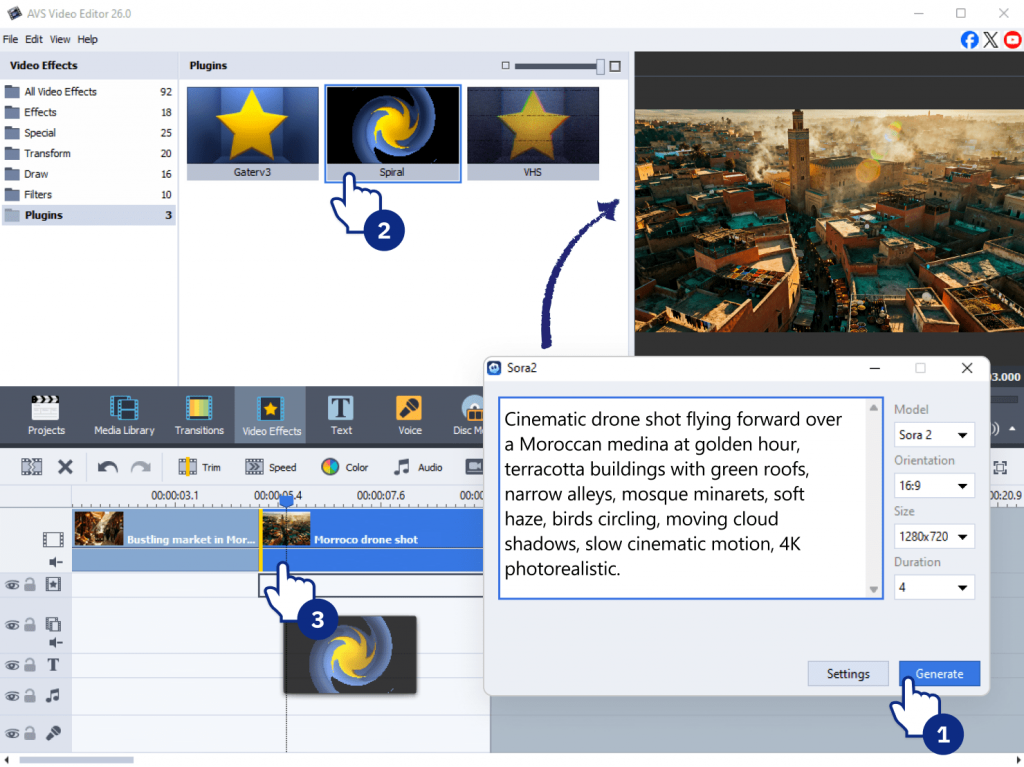
AI Plugin/Effect: Combine Sora2 Video Generator with Effect Restoration Gaterv3 and Effect Spiral, plus standard color enhancements.
Example: You’ve shot some nice but simple video of a bustling market in Morocco. For post-production use the Sora2 plugin to produce a cinematic aerial shot of the city which you didn’t actually capture. Then, apply the Effect Spiral as a dynamic transition between scenes, creating a fast-paced, engaging video.
Why it works: Great for travel bloggers, tourism boards, and avid travelers who want to elevate their vacation memories into compelling visual stories.
5. Produce product teasers for small businesses
Small businesses often lack time or budget for professional video production. AI allows them to craft promotional content quickly and efficiently.
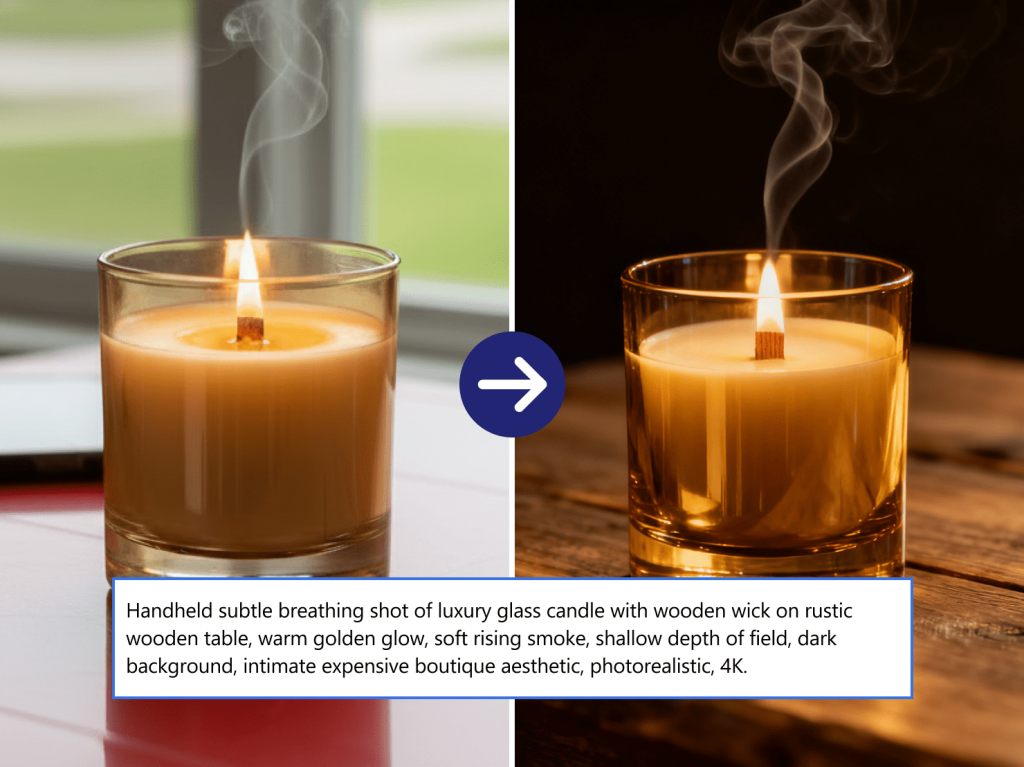
AI Plugin/Effect: Sora2 Video Generator
Example: A small Etsy shop selling handmade candles needs a video teaser for an upcoming launch. The owner takes a few photos of the candle and uses a prompt in the Sora2 plugin, for example, “Cinematic dolly-in shot of a lit candle on a rustic wooden table, with warm, cozy lighting and smoke gently rising” to generate a captivating video clip.
Why it works: Enables entrepreneurs to create marketing content on demand. It’s especially convenient for testing different visual styles or campaign ideas without additional costs.
6. Build before-and-after videos
Transformation videos are highly engaging because they clearly show progress or improvement. AI tools simplify the process of improving footage quality to maximize the “before vs. after” contrast.
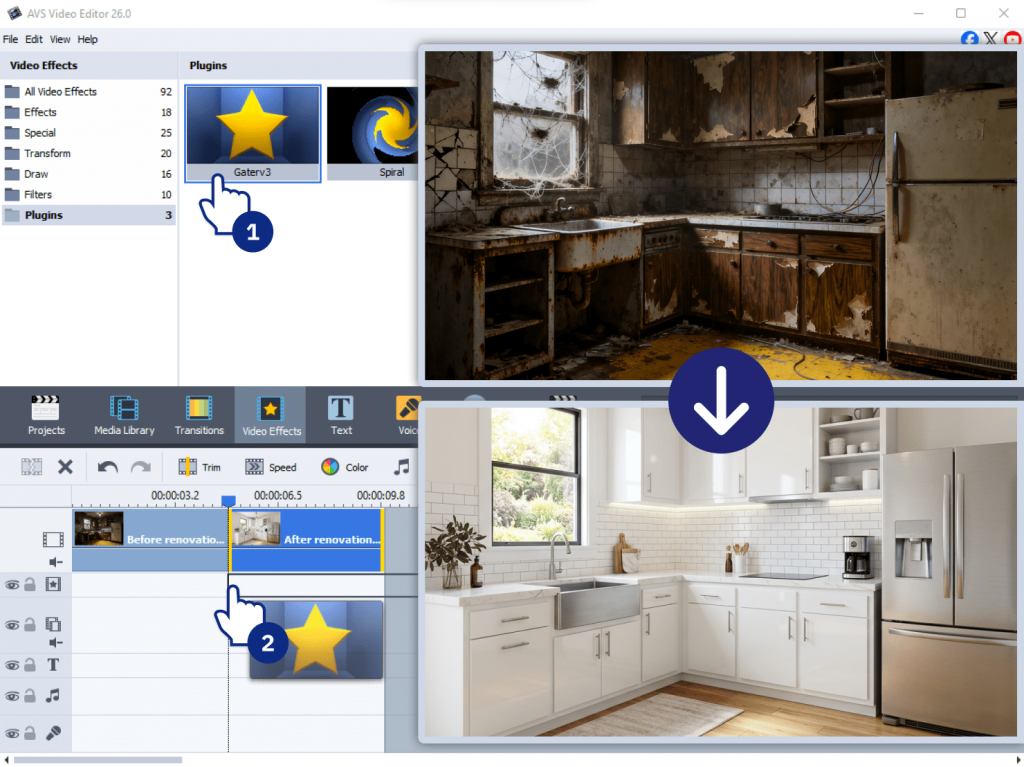
AI Plugin/Effect: Effect Restoration Gaterv3 for the “after” part of the video.
Example: A home renovation company wants to showcase their work. They film a “before” video of a dilapidated kitchen. After the renovation, they film an “after” video. By using the Restoration plugin to sharpen and color-grade the final “after” footage, the difference is even more dramatic.
Why it works: Popular across niches from fitness and beauty to real estate and design. These videos are simple to produce but perform well on social platforms.
7. Design animated slideshows from photos
Static photo collections can feel outdated. AI effects and transitions turn them into dynamic visual stories.
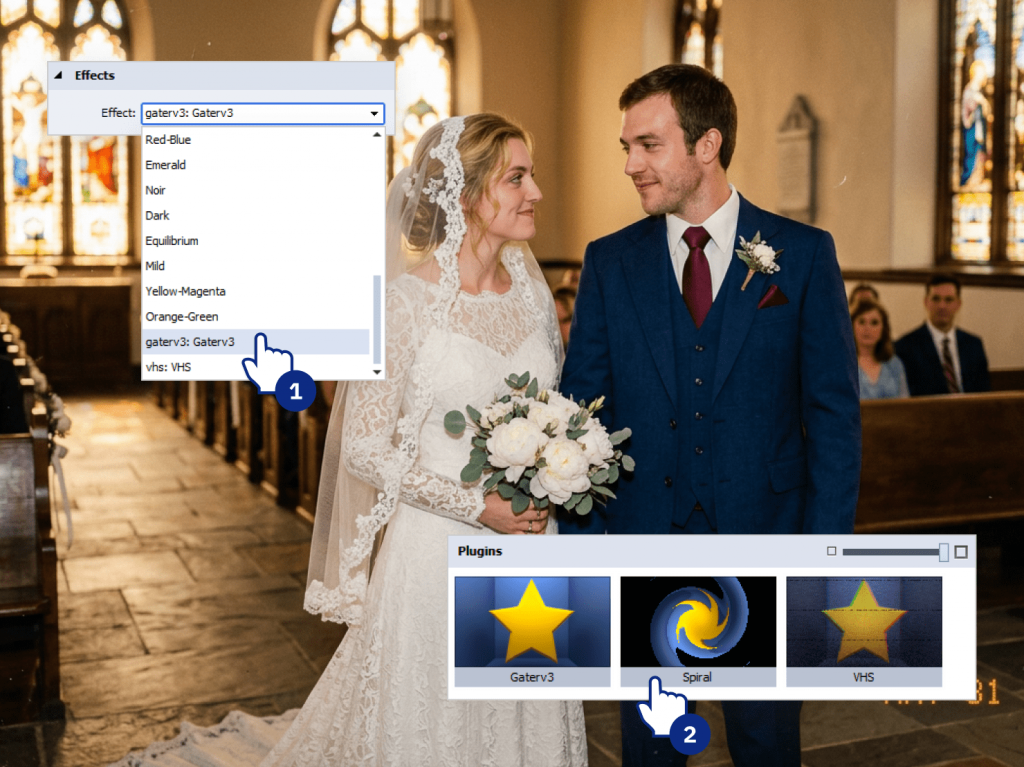
AI Plugin/Effect: AI effects + transitions
Example: For a 50th wedding anniversary, you have a collection of scanned photos from the couple’s life. First, use AVS Image Converter’s AI effects to enhance and color-correct the old photos. Then, in AVS Video Editor, apply the Effect Spiral to create a lively, animated transition between images, so that the slideshow feels much more modern and captivating.
Why it works: Great for personal use, presentations, or social sharing. It adds movement and emotion without requiring advanced animation skills.
8. Generate background visuals for presentations
Instead of spending time searching for stock footage or creating visuals, AI-generated images help you build more engaging and well-balanced presentations faster.
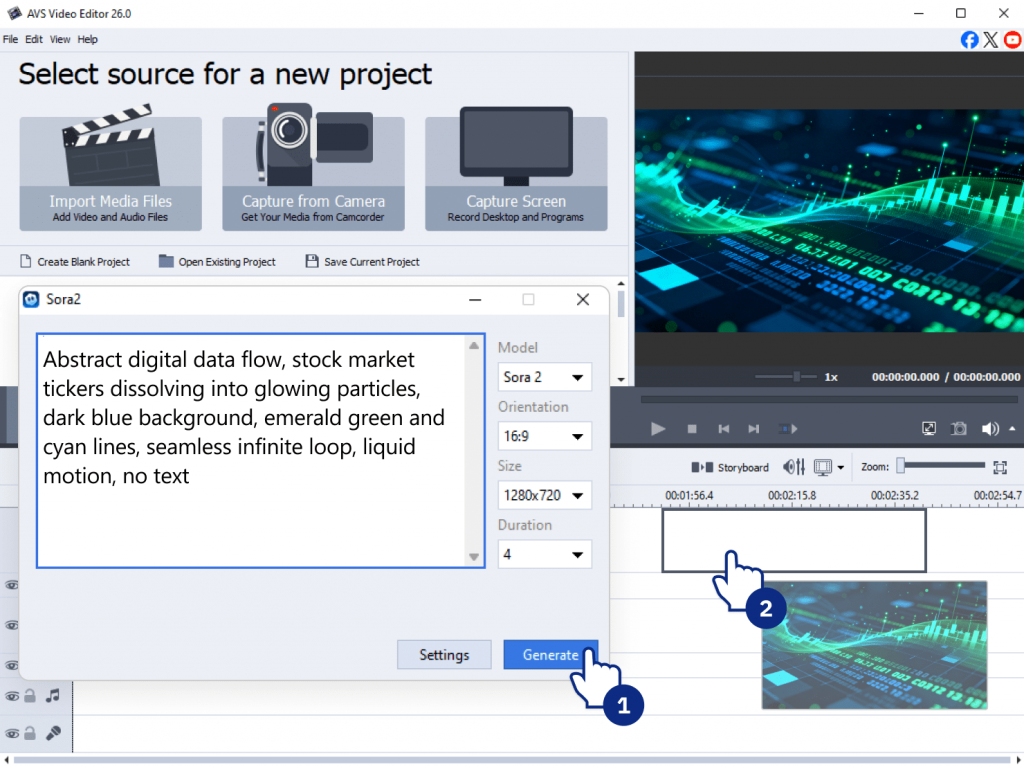
AI Plugin/Effect: Sora2 Video Generator.
Example: A financial analyst needs to give a presentation on “Global Markets in 2026.” A static image is replaced with a 10-second loop generated using the Sora2 plugin. Here is a sample prompt for creating a professional, immersive background: “Abstract digital animation of flowing data and stock market tickers, dark blue and green color palette, seamless loop.”
Why it works: Convenient for professionals, educators, and content creators who want clean, custom slides matching their topic without searching for external assets.
9. Create seasonal greeting videos in minutes
Seasonal content is time-sensitive, and quick production is essential. AI enables you to generate themed videos without starting from scratch.
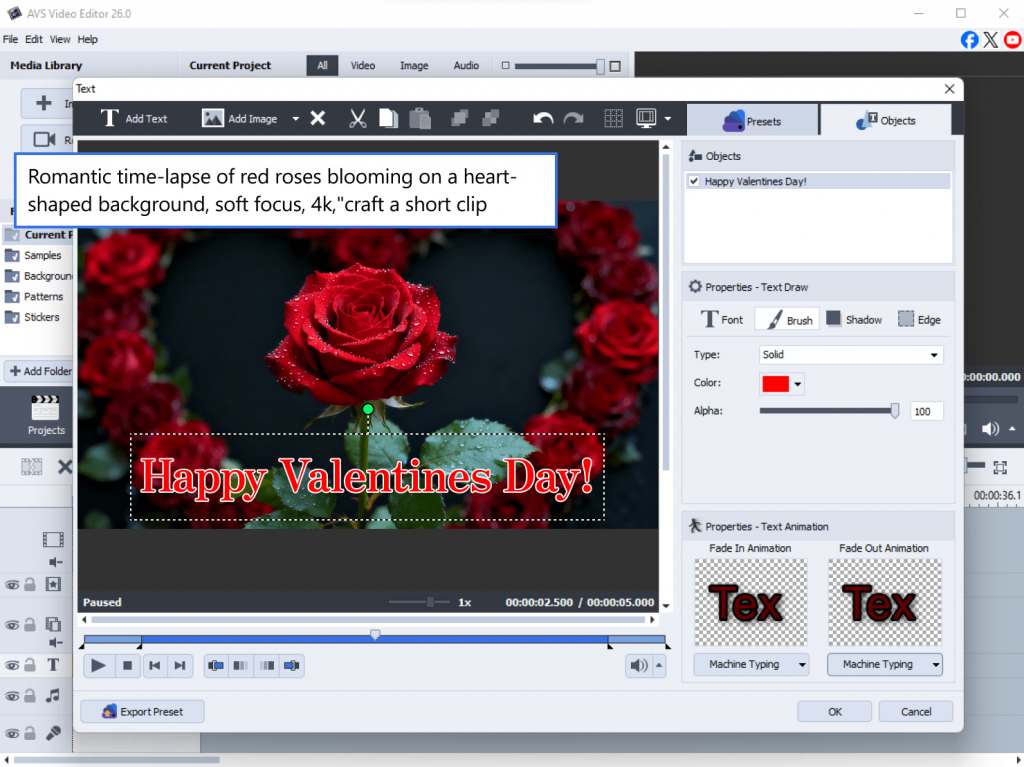
AI Plugin/Effect: Sora2 Video Generator combined with text overlays
Example: It’s the day before Valentine’s Day and you forgot to make a video for your partner. In this case quickly open AVS Video Editor, use the Sora2 plugin with the prompt “Romantic time-lapse of red roses blooming on a heart-shaped background, soft focus, 4k,”craft a short clip, and add a simple “Happy Valentine’s Day” text overlay.
Why it works: Perfect for businesses and individuals who need fast, relevant content for holidays and special occasions.
10. Repurpose blog posts into short AI videos
Written content can be transformed into video format to reach a wider audience. AI simplifies this process by generating clips to deliver the right message and create a special atmosphere for the occasion.
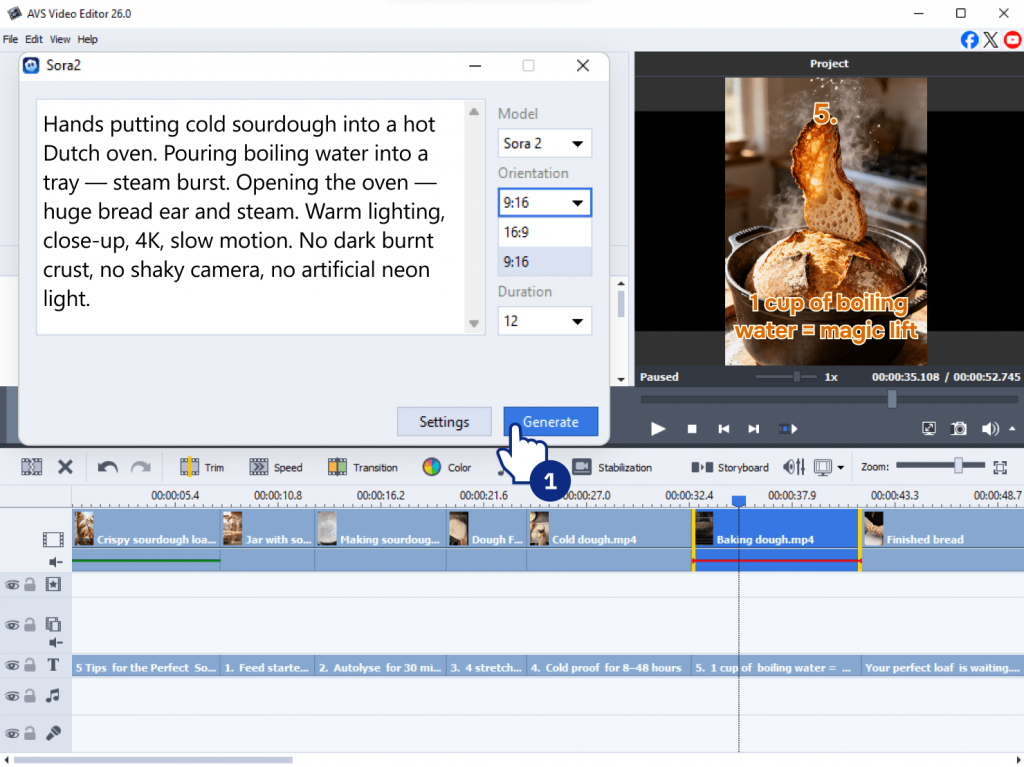
AI Plugin/Effect: Sora2 Video Generator to visualize the highlights of the article
Example: A food blogger publishes a deep dive into “5 Tips for the Perfect Sourdough.” Instead of just sharing a link, they create a short explainer video summarizing the post. They use the Sora2 plugin to produce cinematic clips highlighting the article’s main points (e.g., “Steam rising from a freshly baked artisan loaf”). Using AVS Video Editor, they arrange these clips on the timeline and overlay a short text from the blog to make a quick video summary.
Why it works: Ideal for marketers and content creators looking to maximize the value of existing content and adapt it for YouTube Shorts or LinkedIn.
Tips for improving AI video editing results
To get the most out of your AI-powered workflow, keep these best practices in mind:
- Experiment with different prompts to get better outputs
- Combine AI-generated clips with manual edits for more control
- Apply effects to maintain a balanced look
- Use proper export settings (resolution, bitrate) for your platform
Build your own AI-powered video projects
AVS4YOU offers a Plugins Marketplace where you can explore additional AI tools and effects. Try different combinations, test new workflows, and refine your style over time. The more you experiment, the better your results will become.
You can also explore related blog posts for deeper guides and use cases.
Useful links
FAQ
What is AI video editing?
AI video editing uses machine learning to automate tasks such as generating footage, enhancing quality, and applying effects.
Can AI restore old videos/images?
Yes, absolutely. Effect Restoration Gaterv3 in the AVS4YOU suite is specifically designed for this. It reducesnoise, corrects colors, sharpens blurry details, and improves the overall quality of old or damaged footage.
How does text-to-video work?
Text-to-video generators, such as the Sora2 Video Generator plugin, work by using a large AI model trained on millions of videos and images. When you type a descriptive prompt, the AI interprets your words and generates a new, short video clip based on your description.
Is AI video editing suitable for beginners?
Yes. Most AI tools are designed to simplify editing and reduce manual work.
Can I use these AI plugins for commercial projects?
In most cases, yes, depending on licensing terms. Please, check the terms of service and usage plans of OpenAI and Heygen to ensure the commercial use is available.
How long does it take to generate a video from a text prompt?
Generation time can vary depending on the complexity of the prompt, the resolution, and the current load on the AI provider’s servers. It can take from a few seconds to a couple of minutes.
What kind of prompts work best for the text-to-video generator (Sora2)?
Descriptive and specific prompts work best. Include details about the subject, action, setting, lighting, mood, and camera movement for the most accurate and impressive results .
Do I need a powerful computer to run these AI plugins?
No, you don’t need a supercomputer. Sora2 and Heygen AI plugins do the heavy work in the cloud. Your computer just sends the prompt and gets the finished video, so it doesn’t need much power. However, the most important requirement is a stable internet connection.