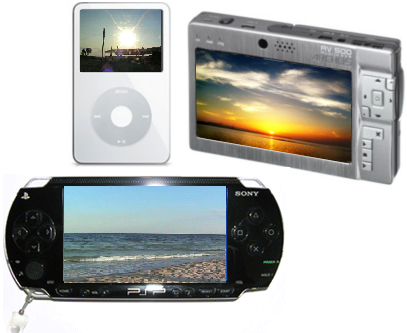
You have a portable video player and would like to watch your favorite home video using it? AVS Video Converter enables you to transfer your home video library to a necessary format with a few mouse clicks.
What you need:
All you need to transfer your home video files to your portable video player is:
- AVS Video Converter
- A portable device capable of video playback with a computer compatible cable
Now AVS Video Converter uses AVS Mobile Uploader included in the AVS Video Converter installation package to upload the files to your portable video player.
Click here to download it. After the download is finished, run the AVSVideoConverter.exe file and follow the installation wizard instructions.
[Back to the Top]
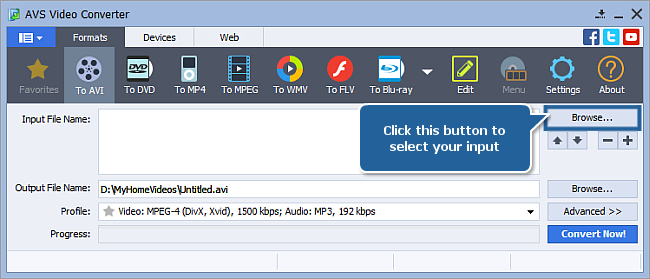
To select a video you would like to convert hit the Browse... button next to the Input File Name field. In the opened Windows Explorer window browse for the necessary video file:
 Note
Note: when your input is a DVD disc, you will need to select the path to your source file: X:\Video_TS\Video_TS.IFO. "X" stands for your DVD-ROM or the hard disk drive folder where your DVD is stored. Please see the
online help section to find more on how to convert your home DVDs to other video formats.
[Back to the Top]
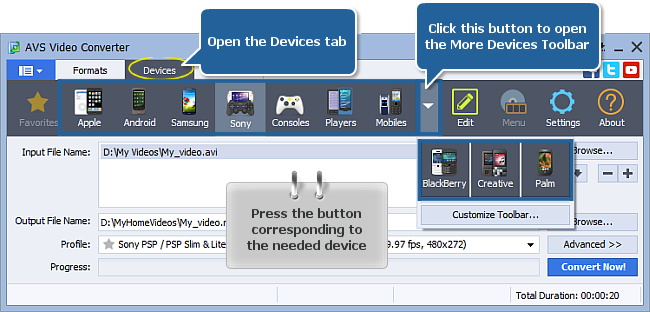
After you have selected the video input file, open the Devices tab of the Main Toolbar and select the button corresponding to the needed device (click the More Devices button to open the More Devices Toolbar, if needed):
- Apple for Apple iPod, Apple iPhone/ iPod Touch, Apple iPad, Apple TV;
- Android for HTC Hero, Motorola Droid/ Milestone etc;
- Samsung for Samsung Galaxy smartphones and tablets;
- Sony for Sony PSP/ PSP Slim & Lite/ PSP Go, Sony PS3 game consoles;
- Consoles for Sony PSP/ PSP Slim & Lite/ PSP Go, Sony PS3, Microsoft XBox360, Nintendo Wii;
- Players for Archos, Microsoft Zune, SanDisk Sansa View, iriver;
- Mobiles for mobile phones with 3GPP and 3GP2 video support;
- BlackBerry for BlackBerry smartphones;
- Creative for Creative ZEN Vision players;
- Palm for Palm Pre, Palm Pixi, Palm Treo smartphones.
The full list of supported devices you can see here.
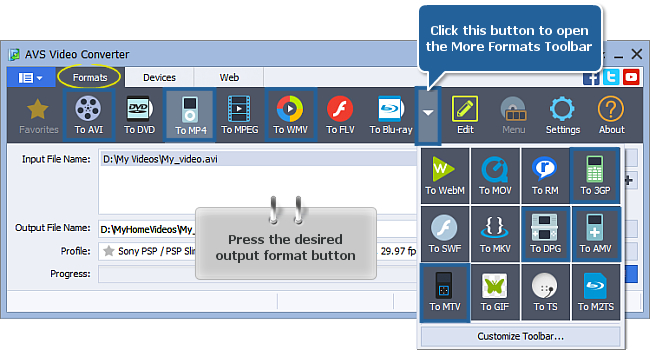
Note: for the same purpose you can also use the
Formats tab of the
Main Toolbar. Select one of the following buttons (click the More Formats button to open the
More Formats Toolbar, if needed):
- To AVI for BlackBerry, Nintendo Wii, Archos, Creative ZEN Vision, SanDisk Sansa View, iriver.
- To MP4 for Apple iPod, Apple iPhone/ iPod Touch, Apple iPad, Android tablets, Microsoft XBox360, Samsung Galaxy, Sony PSP, mobile phones and other devices with MPEG-4 video support;
- To WMV for Pocket PCs running under Mobile Windows OS, like HP iPaq and portable players: Archos and Creative ZEN Vision;
- To 3GP for mobile phones with 3GPP and 3GP2 video support;
- To DPG for Nintendo DS or Nintendo DS Lite handheld game consoles;
- To AMV for MP4 players and S1 MP3 players with video playback;
- To MTV for MP3/MP4 players.
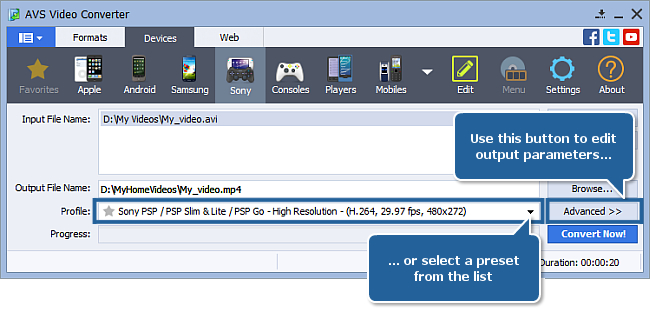
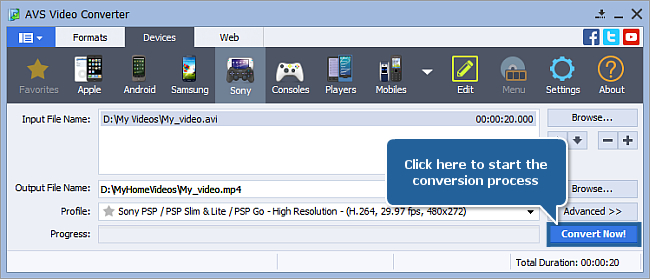
In the list of Profiles (Profile field) select one of the profiles offered for the chosen type of portable device. You can also click the Advanced >> button to manually set the profile parameters in the Output File section of the opened Conversion Options tab.
[Back to the Top]
Click the Browse... button next to the Output File Name field and select a location on your HDD for the output video file.
Note: when you select a location for your output video file, you should save the file to your personal computer HDD.
[Back to the Top]
After you have set up all the conversion parameters, hit the Convert Now! button to start converting.
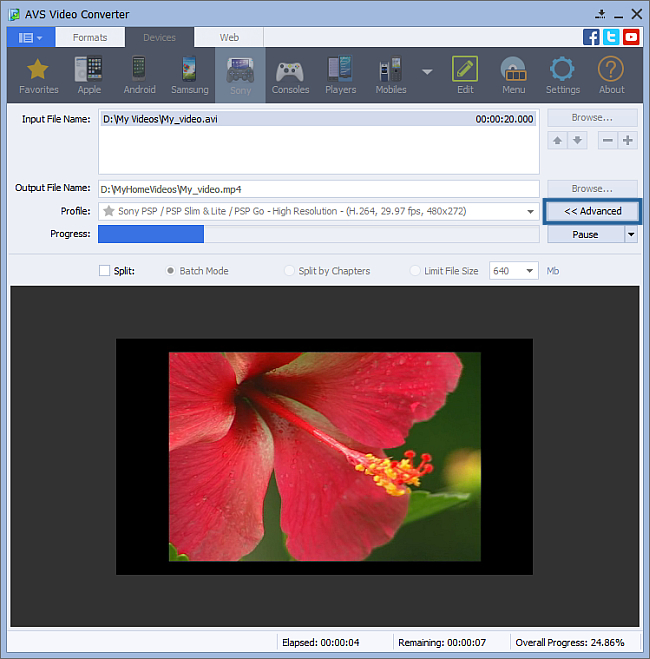
You can visually judge the conversion process if you hit the Advanced>> button.
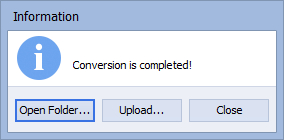
When the process is over the following window will be opened. Click the Upload... button to launch AVS Mobile Uploader.
[Back to the Top]
Connect your portable device to your computer with the help of a cable. Turn on the device.
The AVS Mobile Uploader application will be launched to guide you through the upload process so that you could send your converted video file to your portable with no difficulty.
If your portable player is not displayed in the AVS Mobile Uploader window you should press the Find Devices button to search for it:
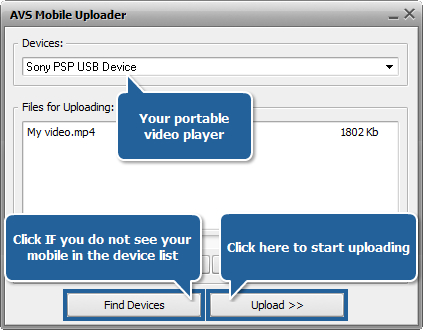
When you click the Upload>> button the upload process itself will take place. It will take some time depending on the output video file size.
Now you can enjoy your favorite home video files on your portable video player!
[Back to the Top]
Version: 12.0.1.650Size: 80.45 MBPlatforms: Windows 10, 8.1, 8, 7, XP, 2003, Vista
(no Mac OS/Linux support)
Download
AVS Video Converter
Registration on AVS4YOU is like buying a single product listed on
www.AVS4YOU.com and getting all other products from our site as a gift. That means you can install and use
ALL OTHER software with the same serial number without additional fees and limitations.
Please note that AVS4YOU programs do not allow you to copy protected material. You may use this software in copying material in which you own the copyright or have obtained permission to copy from the copyright owner.